

Hall Effect technology is often presented in plain, compact gaming boards. The AULA HERO 68XS Wireless Magnetic Switch Keyboard takes a more expressive approach, combining magnetic input with transparent keycaps, a cyber-inspired enclosure and wraparound lighting. Its distinctive proposition is a 68-key wireless gaming format that makes the desk's appearance part of the experience.
This review is based on the product-page specifications and available configurations. It explains how dual 8K reporting, rapid trigger and the compact layout fit together, while separating advertised sensitivity from proven real-world performance. If you want a magnetic keyboard with a stronger visual identity, the HERO 68XS is a model worth examining carefully.
Snow God or Ice Jade: switch comparison
| Listed characteristic | Snow God | Ice Jade |
|---|---|---|
| Total travel | 3.4 ± 0.1mm | 3.4 ± 0.1mm |
| Advertised actuation force | 28 ± 5gf | 28 ± 5gf |
| Light guide | Integrated dual light guide | Integrated single light guide |
| Initial magnetic flux density, 1.6mm PCB | 85 ± 15G | 80 ± 15G |
| Bottom-out magnetic flux density, 1.6mm PCB | 550 ± 60G | 480 ± 60G |
| Current item price | $99.90 | $92.90 |
Both switch options are paired with the same listed dual 8K keyboard platform, 0.005mm RT capability and 6000mAh battery. The manufacturer’s chart does not support calling one a heavier switch: its stated force and total travel are identical. The light-guide structure and magnetic characteristics differ; these figures alone do not establish that one feels faster or sounds better.
Choose Phantom Black / Ice Jade if you want the lower item price with the shared headline keyboard features. Choose Phantom Black / Snow God if you prefer that switch and its dual-light-guide design. Confirm color availability in the selector.
USD item prices checked October 22, 2026, before optional discount codes. Shipping is calculated at checkout; destination taxes or duties may apply. Select the linked configuration to check its current price and availability.

68 keys create space for mouse movement
The 65 percent arrangement keeps dedicated arrow keys but omits a traditional function row and number pad. That can free desk space for a larger mouse movement area, particularly useful when you play with lower sensitivity. The tradeoff is greater reliance on function layers for shortcuts that would otherwise have their own keys.
In the Hall Effect keyboard range, the HERO 68XS suits a gaming-focused desk. Check how you will access function keys and navigation commands in daily work before choosing a 65% board.

Transparent keycaps and a prism-style visual package
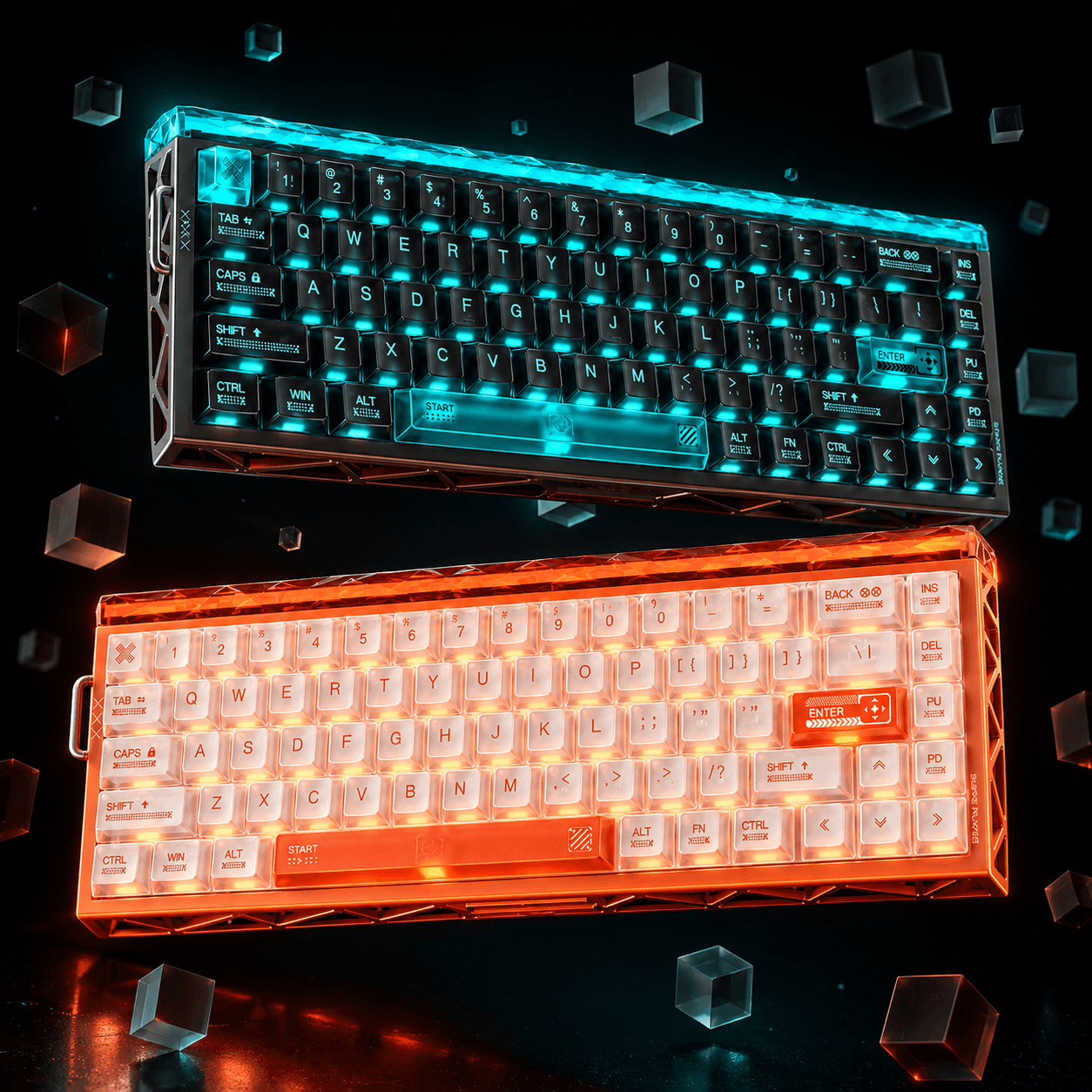
The page describes transparent PC keycaps in a Cherry-style profile, a hollow cyber exterior and a light-box structure. SOFTLIGHT ambient lighting surrounds the design, with south-facing illumination and multiple LEDs beneath the spacebar. These details create a different look from a conventional opaque PBT keyboard.
If you are comparing a wireless Hall Effect keyboard for gaming, the HERO 68XS is especially interesting when you want the lighting to remain part of the product's identity. Cosmic Orange, Phantom Black, Fantasy Pink and Moonlight White configurations provide different ways to style it. The aluminum-alloy plate described inside should not be confused with an entirely aluminum case.
Magnetic sensing and rapid trigger
Hall Effect sensing measures movement through a magnetic system rather than relying on a traditional switch contact. This makes adjustable actuation and rapid trigger possible. The page advertises 0.005mm rapid trigger precision, but the smallest available value is not necessarily the most comfortable setting for your hands.
Begin with moderate movement-key settings and test repeated presses and releases in a practice area. Keep deeper or more conservative settings for typing, chat and less frequently used controls. A separate everyday profile can prevent accidental input outside games. Fine adjustment is valuable because it lets you adapt the board, not because every player must use the same extreme sensitivity.

Dual 8K reporting and what the scan figures mean
The listing specifies dual 8K reporting for wired and 2.4GHz operation, with a theoretical 0.125ms response figure. It also distinguishes a 128K per-key scan claim from a 48K full-key scan claim. These figures refer to different aspects of sensing and communication, so they should not be added together or interpreted as measured finger-to-screen latency.
The HERO 68XS combines receiver-based gaming with compact magnetic control. Bluetooth is a separate convenience mode. Test higher polling on your own computer and games, then keep the setting that behaves consistently.
| Feature | What to expect | Buying consideration |
|---|---|---|
| Layout | 65 percent, 68 keys with arrows | Function keys require a layer |
| Gaming modes | Dual 8K wired and 2.4GHz | Bluetooth is a separate convenience mode |
| Switch choices | Snow God and Ice Jade magnetic options | Verify configuration and compatibility |
| Visual package | Transparent PC caps and ambient lighting | Plate material does not define the entire case |
Construction and battery beyond the gaming headline
The product page describes a gasket arrangement, five internal dampening layers and an aluminum-alloy plate. That gives the board a construction story alongside its input features. Sound and compliance still depend on the selected magnetic switch, transparent caps, desk surface and how firmly you press, so a precise acoustic conclusion would require an actual test.
A listed 6000mAh battery supports wireless use, and the connection system is described as accommodating up to five devices. Runtime will vary with lighting and polling settings. Keep charging practical and use a calmer lighting profile for ordinary work if you prefer a less animated desk during calls or long writing sessions.

Choose the switch and configuration thoughtfully
The switch comparison above gives the shared travel and force values, different light guides and magnetic specifications. Pair the switch with the color you want, then check the exact product option. Do not assume the extra $7 for Snow God buys a higher keyboard polling rate; both options share the listed platform features.
When shopping for a 65 percent magnetic keyboard with rapid trigger, the HERO 68XS deserves attention for its combination of dedicated arrows, wireless reporting and software tuning. A-HUB web configuration includes features such as SOCD, DKS, MT and TGL, together with calibration-related controls. Review each feature and check the rules of the game or competition before using advanced movement behaviors.
AULA HUB and the first setup
Open AULA HUB with the HERO 68XS connected by USB and select the matching keyboard. Save your baseline profile, follow the model’s adaptive-calibration instructions and begin with moderate movement-key settings. Keep a separate typing profile if your gaming settings cause unwanted presses.

The calibration and troubleshooting guide explains the next checks if a key behaves inconsistently. For a dedicated function row instead of the HERO’s 65% layout, compare the Beat75 configurations.
Watch the product demonstration
The buying verdict
The HERO 68XS fits a player who wants magnetic input, a compact layout and a distinctive illuminated design. Its strongest feature is the way those elements form one coherent product, rather than making styling an afterthought. It is less suitable if you depend on a dedicated function row, number pad or a visually restrained opaque-keycap board.
Start with the stock configuration, save a stable profile and adjust only the movement keys you actually use. Confirm the switch pairing before checkout and learn the layer shortcuts early. With realistic expectations, the HERO 68XS is a compelling shortlist option for a desk that values both adjustable control and an expressive visual presence.
FAQ
Is the HERO 68XS wireless?
Yes. The listing includes 2.4GHz, Bluetooth and wired operation.
Does it have a dedicated function row?
No. Its 65 percent layout uses layers for function-key access.
Should all keys use minimum actuation settings?
No. Use stable settings and tune movement keys separately from typing keys.


댓글 남기기
이 사이트는 hCaptcha에 의해 보호되며, hCaptcha의 개인 정보 보호 정책 과 서비스 약관 이 적용됩니다.