
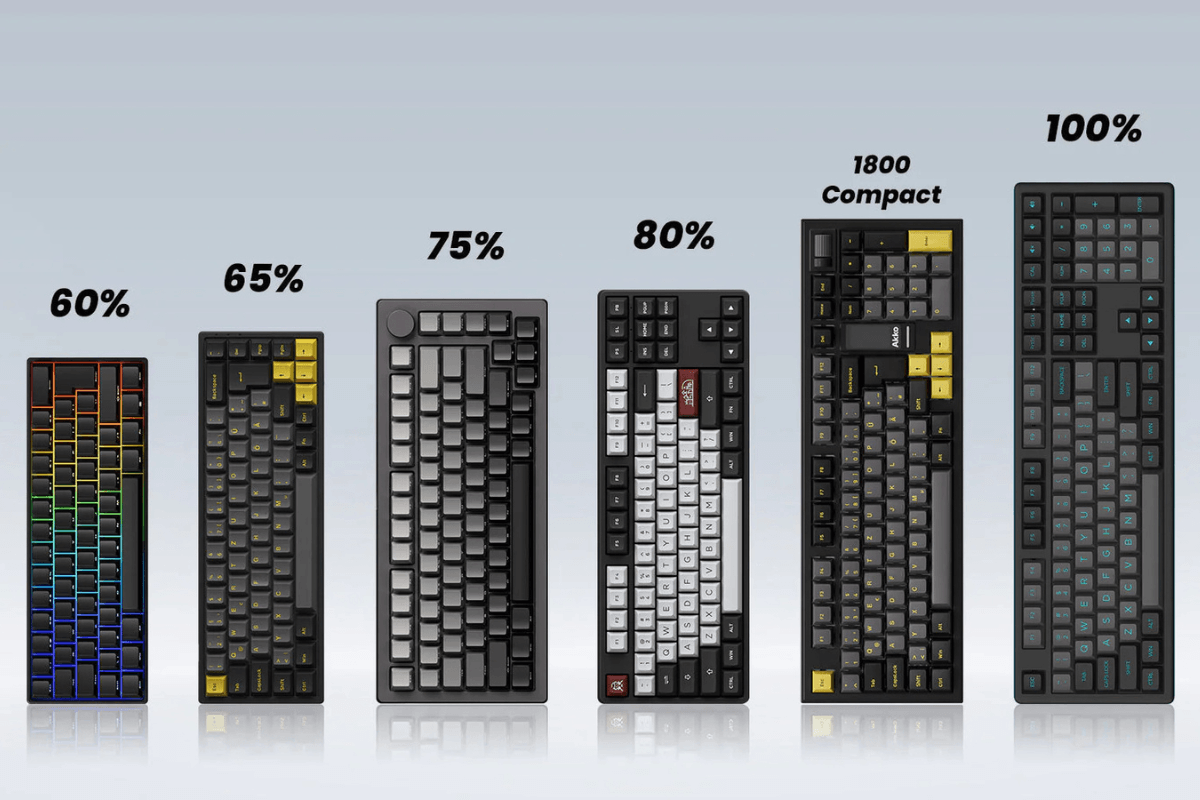
Die Wahl der richtigen Tastaturgrößen kann Ihre Spielerfahrung, den Platz auf dem Schreibtisch und den täglichen Komfort erheblich beeinflussen. Von kompakten 60%- und 65%-Layouts bis hin zu den vielseitigeren 75%- und TKL-Designs bietet jede Größe eine andere Balance aus Funktionalität und Bequemlichkeit. In diesem Leitfaden vergleichen wir diese vier beliebten Tastaturgrößen, um Ihnen zu helfen, die beste Lösung für Ihr Gaming-Setup zu finden.
60% Tastaturen – Die kleinsten und kompaktesten
Eine 60% Tastatur ist eines der kompaktesten mechanischen Tastaturlayouts. Sie behält nur die wichtigsten alphanumerischen Tasten und entfernt die eigene Funktionszeile, Pfeiltasten und die Navigationsgruppe. Durch ihre kleine Stellfläche bleibt deutlich mehr Platz auf dem Schreibtisch für die Maus, was sie besonders bei FPS- und kompetitiven Gamern beliebt macht.

Der Hauptvorteil einer 60% Tastatur liegt in ihrer Tragbarkeit und dem minimalistischen Design. Allerdings kann es eine Weile dauern, bis man sich an die fehlenden Tasten gewöhnt, da Funktionen wie Pfeiltasten und F1–F12 in der Regel über Fn-Kombinationen aufgerufen werden. Eine 60% Tastatur ist am besten für Gamer geeignet, die ein aufgeräumtes Setup, maximale Mausfläche und ein kompaktes Layout gegenüber dem schnellen Zugriff auf eigene Tasten bevorzugen.
65% Tastaturen – Kompakt, ohne auf Pfeiltasten verzichten zu müssen
Eine 65%-Tastatur bietet eine Balance zwischen Kompaktheit und Alltagsfunktionalität. Im Vergleich zu einem 60%-Layout fügt sie dedizierte Pfeiltasten und einige Navigationstasten hinzu, während die Funktionsreihe entfernt bleibt. Das gibt Spielern einen bequemeren Zugriff auf häufig verwendete Tasten, ohne viel zusätzlichen Schreibtischplatz zu beanspruchen.

Für Gaming bietet eine 65%-Tastatur reichlich Platz für Mausbewegungen und ist gleichzeitig einfacher für alltägliches Tippen und Navigieren zu verwenden als ein 60%-Modell. Ihr kompaktes und dennoch praktisches Layout macht sie zu einer beliebten Wahl für Nutzer, die eine Tastatur suchen, die sich sowohl für Gaming als auch für den Alltag eignet. Wenn Sie die Vorteile einer kleineren Tastatur nutzen möchten, ohne auf dedizierte Pfeiltasten zu verzichten, ist 65% oft der ideale Kompromiss.
75%-Tastaturen – Mehr Funktionalität, dennoch kompakt
Eine 75%-Tastatur bietet mehr Funktionalität und behält dabei eine relativ kompakte Grundfläche. Sie umfasst in der Regel dedizierte Pfeiltasten, eine vollständige Funktionsreihe und mehrere Navigationstasten, während der Ziffernblock wegfällt. Das macht sie vielseitiger als eine 65%-Tastatur, ohne so viel Schreibtischplatz zu beanspruchen wie ein TKL-Modell.

Für Spieler, die ihre Tastatur auch für Arbeit, Studium oder alltägliche Aufgaben nutzen, kann ein 75%-Tastatur Layout ein ausgezeichneter Mittelweg sein. Sie erhalten schnellen Zugriff auf F1–F12 und Navigationstasten und haben dabei weiterhin genügend Platz für Ihre Maus. Es ist eine großartige Wahl für Nutzer, die mehr Funktionalität wünschen, ohne zu viel Schreibtischplatz zu opfern.
80% | TKL-Tastaturen – Das beste traditionelle Layout
Eine TKL-Tastatur (Tenkeyless) behält fast alles, was eine herkömmliche Tastatur in voller Größe bietet, außer dem Nummernblock. Sie verfügt über dedizierte Pfeiltasten, eine vollständige Funktionstastenreihe und Navigationstasten, was sie für Gaming und den täglichen Gebrauch vertraut und praktisch macht.

Im Vergleich zu kleineren Layouts nimmt eine Tenkeyless-Tastatur mehr Platz auf dem Schreibtisch ein, bietet aber einen einfacheren Zugang zu wichtigen Tasten, ohne die Sperrigkeit einer Tastatur in voller Größe. Für Gamer, die auch häufig tippen, arbeiten oder schnellen Zugriff auf Funktionstasten und Navigationstasten benötigen, bleibt TKL eine praktische und vielseitige Wahl. Sie eignet sich besonders für Benutzer, die ein traditionelles Tastaturlayout ohne Nummernblock bevorzugen.
60% vs 65% vs 75% vs TKL: Direkter Vergleich
Jede Tastaturgröße bietet eine andere Balance zwischen Kompaktheit und Funktionalität. Die folgende Tabelle bietet einen schnellen Vergleich, um die wichtigsten Unterschiede auf einen Blick zu erkennen.
|
Tastaturgröße |
Pfeiltasten |
Funktionstastenreihe |
Schreibtischplatz |
Am besten für |
|
60% |
Nein |
Nein |
Kleinste |
FPS-Gaming, minimalistische Setups |
|
65% |
Ja |
Nein |
Sehr klein |
Gaming und Alltagsgebrauch |
|
75% |
Ja |
Ja |
Klein |
Gaming, Arbeit und Produktivität |
|
TKL |
Ja |
Ja |
Mittel |
Gaming und traditionelles Tippen |
Im Allgemeinen sind 60%-Tastaturen am besten, wenn das Sparen von Schreibtischplatz oberste Priorität hat, während 65%-Tastaturen durch zusätzliche Pfeiltasten eine bessere Balance bieten. 75%-Tastaturen bieten noch mehr Funktionalität, ohne zu groß zu werden, und TKL-Tastaturen sind ideal für Benutzer, die ein vertrautes, traditionelles Layout bevorzugen. Ihre Wahl hängt letztendlich davon ab, welche Tasten Sie am häufigsten verwenden und wie viel Schreibtischplatz Sie für Ihre Maus freihalten möchten.
Welche Tastaturgröße sollten Sie wählen?

Die beste Tastaturgröße hängt von Ihren Gaming-Gewohnheiten, dem Schreibtischplatz und davon ab, wie oft Sie Tasten außerhalb des Hauptschreibbereichs verwenden. Wählen Sie eine 60%-Tastatur, wenn Sie den kleinsten Platzbedarf und maximalen Platz für die Maus wünschen, besonders für FPS-Gaming. Wählen Sie 65%, wenn Sie ein kompaktes Setup wünschen, aber dennoch dedizierte Pfeiltasten benötigen. Wählen Sie 75%, wenn Sie regelmäßig Funktions- und Navigationstasten verwenden und Ihr Setup relativ kompakt halten möchten. Wählen Sie TKL, wenn Sie ein traditionelles Layout bevorzugen und einfachen Zugriff auf die meisten Tasten ohne die zusätzliche Größe einer vollwertigen Tastatur wünschen. Für die meisten Gamer, die eine Balance aus Funktionalität und Schreibtischplatz suchen, GamePeripherals Gaming-Zubehör kann mit einer 65%-Tastatur für ein praktisches, ausgewogenes Setup kombiniert werden.

Einen Kommentar hinterlassen
Diese Website ist durch hCaptcha geschützt und es gelten die allgemeinen Geschäftsbedingungen und Datenschutzbestimmungen von hCaptcha.