

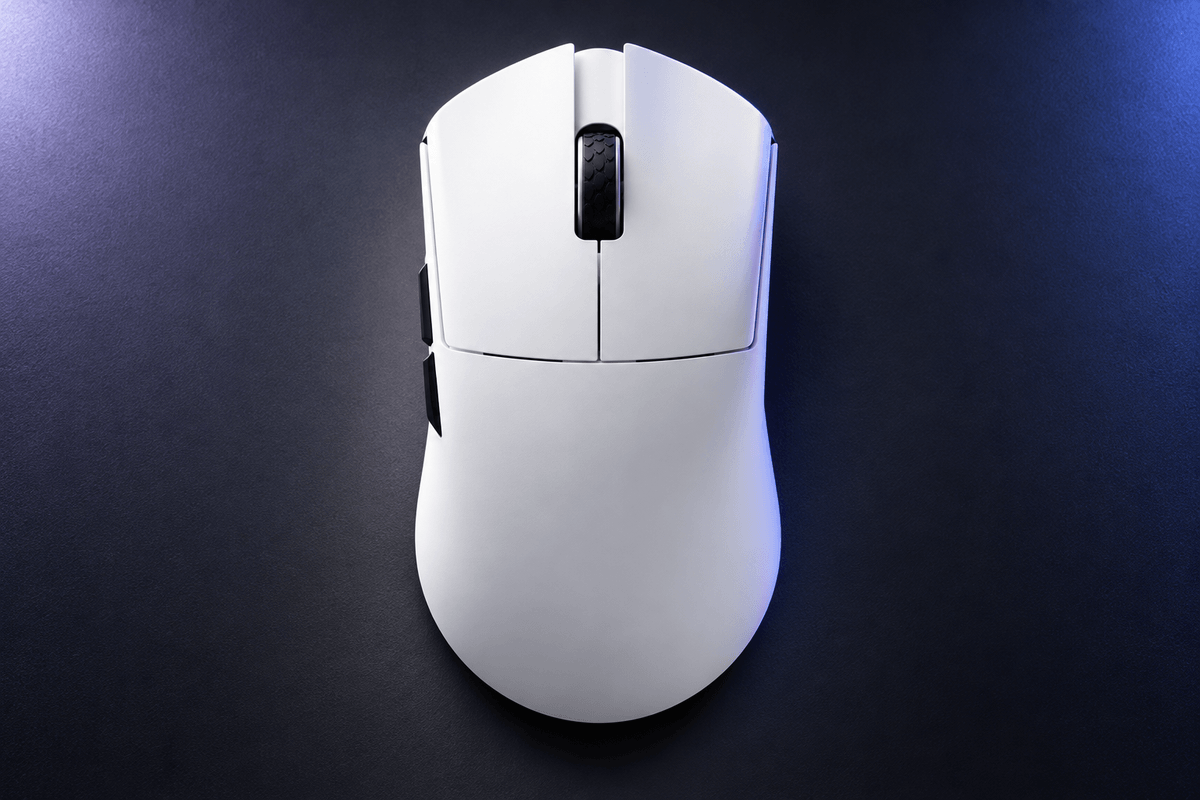
A mouse can have excellent electronics and still feel wrong if your hand has outgrown its shape. The Darmoshark M9 Large Hands 8K Wireless Gaming Mouse addresses that problem directly with a 136.5mm-long symmetrical body, broad support and a listed weight of approximately 59g. Its defining feature is the amount of mouse you can hold without the mass normally associated with a substantial body.
The M9 also pairs a PAW3950 sensor with a Nordic 54L15 controller, dual 8K polling and a receiver that displays key settings. Those features make the larger shape a serious gaming option rather than simply an oversized office mouse. This review focuses on how its dimensions, hardware and visible status information work together.
Built for hands that find regular mice cramped
The listed dimensions are 136.5 × 68.1 × 43.5mm. Darmoshark's hand-length guide recommends the M9 for players over 21cm, measured from the wrist crease to the tip of the middle finger. That is a useful starting point when ordinary large mice still leave your fingers crowded or your palm insufficiently supported.
Within the range of GamePeripherals mice for large hands, the M9 is especially distinctive for combining that length with a symmetrical shape. It offers a different option from a large mouse with strongly sloped right-handed contours. Palm and claw users may appreciate the extra support, but hand length alone cannot settle fit. Compare width and hump height with your current mouse as well as the overall length.

A large footprint with a low listed weight
At approximately 59g, the M9 avoids making size synonymous with a heavy mouse. The product page describes a reinforced internal frame intended to resist flexing. That combination is appealing if you want a substantial contact area while keeping repeated lifts and changes of direction manageable.
Low weight does not make a 136.5mm body feel small, however. The larger footprint can change where your fingers settle and how the rear meets your palm. Think about both the support you want and the space you need for finger adjustments. If you regularly choose small fingertip mice because you prefer minimal contact, the M9's extra body may be the wrong kind of change.
A display receiver keeps settings in view
The included 8K receiver uses an NXP solution and has a display for DPI, polling rate and battery level. This is a useful distinction: the screen sits on the receiver at your desk, while the mouse body remains focused on grip and movement. It gives you a way to verify settings without treating the mouse itself as a display device.
For buyers seeking a lightweight gaming mouse for extra large hands, that accessory helps make the overall setup easier to understand. The product table lists 1,000Hz as the factory default in both wired and 2.4GHz modes, with up to 8,000Hz selected through the driver. Check the active setting after configuration rather than assuming that an 8K-capable mouse always starts at its maximum rate.

How the M9 differs from the M3 footprint
The M9 is a more specialized size choice than Darmoshark's M3 family. The store lists M3 at 129.5 × 66 × 39mm and approximately 58g, aimed at medium to large hands. M9 adds 7mm in length, 2.1mm in width and 4.5mm in height, while the nominal weight increases by only about one gram.
Those differences explain why the two products should not be selected by weight alone. A taller, longer body changes support and finger reach even when the mass is similar. The comparison below uses the store's listed measurements. Choose M9 when you specifically need the additional body, and consider the M3 footprint if you want more room than a compact mouse without moving as far into extra-large sizing.
| Specification | Darmoshark M9 | Darmoshark M3 Series |
|---|---|---|
| Listed dimensions | 136.5 × 68.1 × 43.5mm | 129.5 × 66 × 39mm |
| Listed weight | Approx. 59g | Approx. 58g |
| Positioning | Extra-large hands | Medium to large hands |
| Fit priority | More length and rear support | A smaller footprint than M9 |
Tracking and clicks match the gaming brief
The PAW3950 sensor is paired with Nordic 54L15 electronics and a listed 30,000 DPI resolution. The page also describes an optional 20K competitive scanning mode. Sensor scanning and game frame rate are different quantities, so that feature should not be interpreted as generating additional frames in your game.
Among the GamePeripherals 8K mouse range, M9 stands out for putting this hardware inside a shape that serves a less common hand-size requirement. The store specifies FE optical main switches and a 100-million-click lifespan rating. The rating describes the advertised component target, not a guarantee of identical feel over time. Check main-button reach, single-click behavior and side-button access with your normal grip before changing sensitivity to suit the new mouse.

Use the connection that suits the task
M9 supports wired use, 2.4GHz wireless and Bluetooth. Wired and receiver modes are listed up to 8,000Hz; Bluetooth is fixed at 125Hz. At 8,000Hz, the nominal reporting interval is 0.125ms. That interval describes report timing rather than the complete delay between a physical action and a visible response on screen.
When shopping for an 8K wireless mouse with a display receiver, confirm stable operation at the polling rate you actually intend to use. Start with familiar DPI and sensitivity, place the receiver close to the mouse and check performance in your usual games. The package lists a USB paracord cable, skates and grip tape in addition to the receiver, giving you practical accessories for settling into the larger shape.
Verdict for players who need more mouse to hold
The M9's strongest selling point is specific and useful: an extra-large symmetrical body at approximately 59g, backed by modern tracking, optical clicks and an informative receiver. It is most compelling for players whose current mice feel too short or too low despite having adequate gaming performance.
Choose it because you want its 136.5mm length and fuller support, then use the driver and receiver display to establish a reliable setup. Black, white and translucent black finishes offer different looks without changing the core sizing decision. If those dimensions match what has been missing from your grip, the M9 offers a distinctive solution.
FAQ
Who is the Darmoshark M9 designed for?
The product page targets extra-large hands, with a starting recommendation of hand length over 21cm.
Is its screen built into the mouse?
No. DPI, polling rate and battery information are shown on the included display receiver.
Does M9 use 8K out of the box?
The table lists 1,000Hz as the factory default. Wired and 2.4GHz modes can be adjusted up to 8,000Hz through the driver.


Einen Kommentar hinterlassen
Diese Website ist durch hCaptcha geschützt und es gelten die allgemeinen Geschäftsbedingungen und Datenschutzbestimmungen von hCaptcha.