
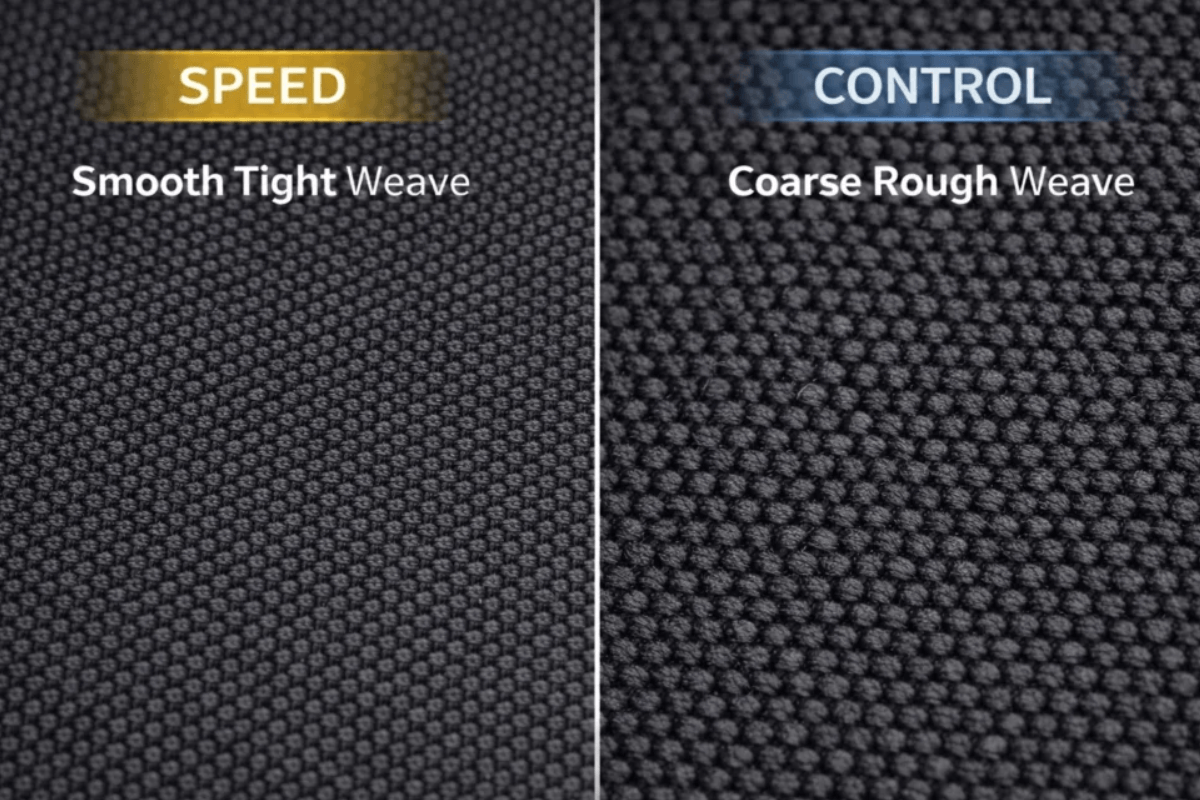
A mouse pad can change how your gaming mouse feels just as noticeably as switching skates or adjusting sensitivity. Some surfaces allow the mouse to glide with very little resistance, while others provide more friction to help you stop and control movements.
The choice between speed and control is not about one being universally better. Your preferred games, aiming style, mouse weight, skates, and sensitivity all influence which surface feels right. When exploring mouse pad options at the GamePeripherals Official Store, understanding these differences can help you build a setup that supports consistent, comfortable mouse movement.
What Is a Speed Mouse Pad?
A speed mouse pad is designed to reduce friction and allow the mouse to glide more freely. These surfaces often feel smoother or less resistant, although texture and materials vary between products.
Low friction can make large movements easier, particularly for players who use low sensitivity and move their mouse across a wide area. Speed pads can also feel fluid during continuous tracking, where the mouse follows a moving target.

However, a faster surface may require more effort to stop precisely. Players who are used to a slower pad may initially overshoot targets until they adapt their hand control.
What Is a Control Mouse Pad?
A control mouse pad generally provides more resistance against mouse movement. This friction can make it easier for some players to stop the mouse at a desired position and perform small adjustments.
Control surfaces are often associated with tactical FPS games, where precise crosshair placement and stopping accuracy are important. They can also appeal to users who prefer a more planted feeling during everyday desktop work.

Not every control pad feels rough or slow. Some offer a balanced glide with moderate resistance, so the distinction between speed and control is better understood as a spectrum rather than two completely separate categories.
Speed vs Control Mouse Pads: Key Differences
The main difference is how much resistance the surface creates during movement and stopping. Neither category automatically improves aim; each changes the way your mouse responds to your hand.
| Feature | Speed Mouse Pad | Control Mouse Pad |
| Surface Feel | Smoother, freer glide | More resistance |
| Friction | Generally lower | Generally higher |
| Glide Speed | Faster | Moderate to slower |
| Stopping Power | Requires more hand control | Easier for some players |
| Micro-Adjustments | Light, fluid movement | More deliberate movement |
| Fast Tracking | Well suited to continuous motion | More resistance during motion |
| Flick Shots | Easier to initiate quickly | Can help with stopping |
| Common Preference | Tracking and low-sensitivity players | Precision-focused players |
These are general tendencies, not guaranteed results. Surface coating, weave, humidity, wear, and mouse skates can all change how a particular pad feels.
Which Is Better for FPS Gaming?
FPS games place different demands on mouse control. Tracking-heavy games often involve following moving targets continuously, while tactical shooters may place greater emphasis on crosshair placement, flicking, and stopping.
A speed pad can appeal to players who prefer fluid movement and use lower sensitivity. A control pad may feel more predictable for players who want additional resistance when stopping after a flick.

When comparing GamePeripherals gaming gear, consider the complete setup rather than choosing a surface based only on the game genre. Your mouse shape, weight, sensitivity, and aiming technique can all influence whether a faster or slower pad feels more comfortable.
How to Choose the Right Mouse Pad
Start by identifying what you dislike about your current setup. If your mouse feels difficult to move during large swipes, a lower-friction surface may be worth considering. If you frequently overshoot targets or struggle to stop precisely, a more controlled surface could be a better fit.
Next, consider your mouse weight, skates, sensitivity, and available desk space. A large pad is useful for low-sensitivity gaming, while a smaller surface may be sufficient for users who make shorter movements.
TITANNATION XSoft ESport Gaming Mouse Pad
The TITANNATION XSoft ESport Gaming Mouse Pad is worth considering for players who want a gaming-focused surface for FPS titles and other precision-oriented games. Its XSoft design is particularly relevant for users who prefer a softer base and a more cushioned feel beneath the mouse.
When comparing this pad with other options, consider how its surface friction, base softness, and dimensions work with your mouse skates and sensitivity. A softer base can also change the way the surface feels under pressure, so players who prefer a firmer, more consistent glide should take that into account.
Heizhu Anime Mouse Pad
The Heizhu Anime Mouse Pad is an appealing option for gamers who want their mouse pad to contribute to the visual style of their setup. Its anime-inspired design makes it especially suitable for themed desks, colorful keyboards, and personalized gaming spaces.
Appearance should not be the only consideration, however. When choosing a GamePeripherals mouse pad, compare the Heizhu's available dimensions, surface material, base, and glide characteristics with your preferred mouse and gaming style. This helps ensure that the pad complements both your desk aesthetic and everyday mouse control.
Ultimately, choose the TITANNATION XSoft if a gaming-focused design and softer base are your priorities, or consider the Heizhu if anime-inspired styling is an important part of your setup. For either option, the best choice depends on how the actual surface feels with your mouse rather than appearance alone.
FAQs
Is a speed mouse pad better for FPS?
Not necessarily. Speed pads can support fluid tracking and large movements, but some FPS players prefer the additional stopping resistance of control surfaces.
Does a faster mouse pad increase sensitivity?
It does not change your in-game sensitivity setting. However, lower friction can make the mouse feel faster because less physical effort is required to move it
Should I choose a thick or thin mouse pad?
Choose based on your preference for cushioning, firmness, and desk comfort. Thickness does not automatically determine whether a pad is speed-oriented or control-oriented.


Einen Kommentar hinterlassen
Diese Website ist durch hCaptcha geschützt und es gelten die allgemeinen Geschäftsbedingungen und Datenschutzbestimmungen von hCaptcha.