
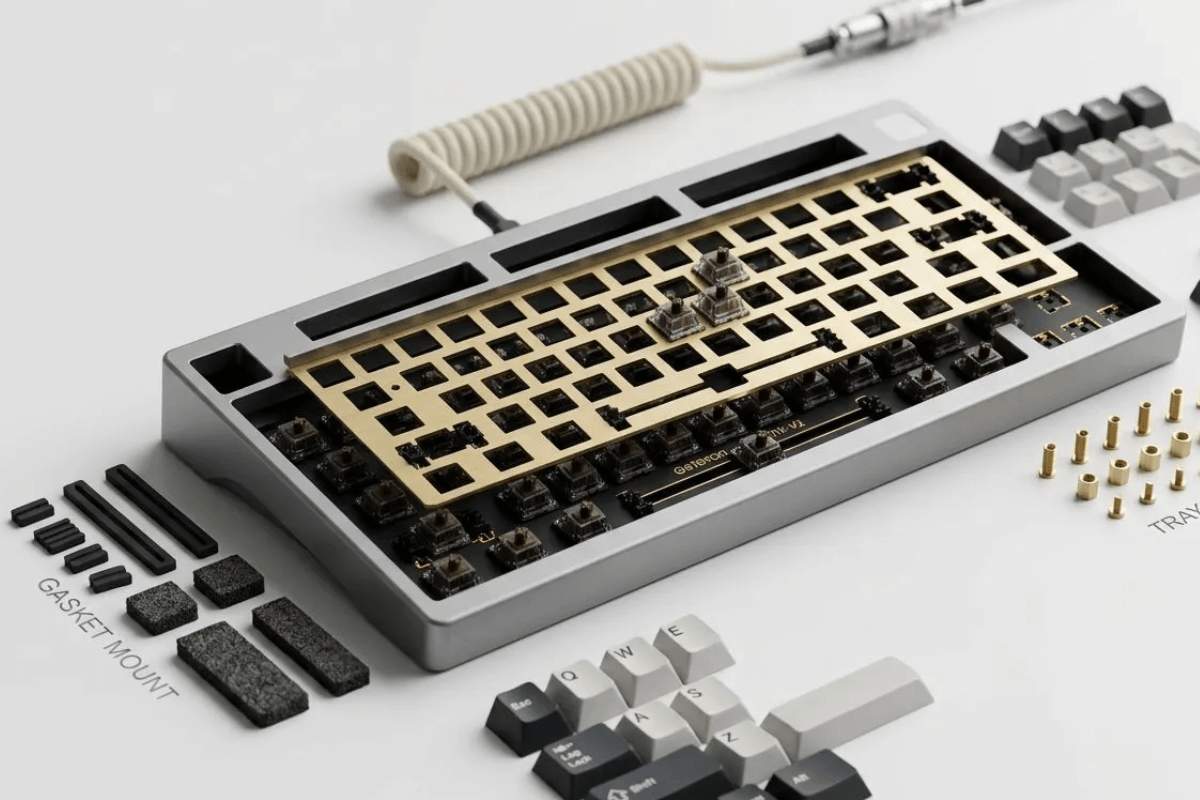
When comparing mechanical keyboards, switches and keycaps usually get most of the attention. However, the way the plate and PCB are secured inside the case can also influence how a keyboard feels and sounds. When browsing GamePeripherals gaming keyboards, understanding different keyboard mounting styles can therefore make it easier to choose a board that matches your preferences.
Three common designs are gasket mount, tray mount, and top mount. None is automatically better for every user. Gasket mounts generally prioritize a softer, more isolated feel, tray mounts offer simplicity and firmness, while top mounts often provide a controlled balance between consistency and flexibility.
What Is a Keyboard Mounting Style?
A keyboard's mounting style describes how the internal assembly—typically the PCB, plate, or both—is secured to the case. The mounting points affect how forces from each keystroke travel through the keyboard.
Mounting design is only one part of the experience. Plate material, case construction, switches, keycaps, foam, PCB design, and other components can all affect sound and feel. Two keyboards using the same mounting system can therefore feel noticeably different.
Gasket Mount vs Tray Mount vs Top Mount: Quick Comparison
| Feature | Gasket Mount | Tray Mount | Top Mount |
| Mounting method | Gaskets isolate plate/PCB from case | PCB attaches to case posts | Plate secured to the upper case |
| General feel | Softer, more cushioned | Firmer | Controlled; varies with plate and case design |
| Flex potential | Often higher | Usually lower | Depends on plate and mounting points |
| Assembly complexity | Moderate to high | Simple | Design-dependent |
| Common appeal | Comfort and sound tuning | Simplicity and firm feedback | Plate-supported feel and tuning options |
These are general characteristics rather than guarantees. The implementation of the keyboard can matter as much as the mounting category itself.
What Is a Gasket Mount Keyboard?
A gasket-mounted design places compressible material, such as silicone or foam gaskets, between the keyboard assembly and the case. Instead of rigidly attaching the plate directly to the case at several hard mounting points, the gaskets provide a degree of isolation.

Because of this construction, a well-designed gasket mount keyboard can offer a softer bottom-out sensation and more movement under pressure. For users exploring GamePeripherals gaming keyboards, this mounting design can be especially appealing when a cushioned typing feel and greater acoustic isolation are priorities. The isolation may also reduce some vibrations transferred directly into the case, influencing the keyboard's acoustic character.Not every gasket implementation feels soft, however. Gasket thickness and material, plate stiffness, available internal space, and case construction all influence the final result.
What Is a Tray Mount Keyboard?
Tray mount is one of the simpler keyboard mounting designs. In this layout, the PCB is typically screwed onto mounting posts located inside the bottom case, similar to placing the keyboard assembly into a tray.

This construction is straightforward and can produce a firm typing platform. It is also commonly associated with relatively simple case designs.
One potential drawback is that fixed mounting points can create differences in stiffness across the board. Areas close to screw posts may feel firmer than areas farther away, although the extent of this effect depends heavily on the specific design.
For gamers who prefer a solid keyboard with minimal movement, tray mount can still be an appealing choice.
What Is a Top Mount Keyboard?
With a top-mounted keyboard, the plate is typically secured to the upper portion of the case. The PCB and switches sit with the plate rather than being screwed directly onto posts across the bottom case.

This approach can provide a controlled typing feel while allowing some flex depending on the plate and case design. Compared with tray mount, the mounting pressure is generally concentrated around the plate perimeter instead of multiple PCB mounting posts.
As a result, top mount is often chosen by users who want a balance between structural stability and a less rigid typing experience.
Which Mounting Style Should You Choose?
Choose based on the experience you want rather than assuming one design is objectively superior.
Choose gasket mount if you want:
- A potentially softer typing feel
- More isolation between the assembly and case
- Greater interest in sound and feel customization
Choose tray mount if you want:
- A firm typing platform
- Straightforward construction
- Minimal flex
Choose top mount if you want:
- Controlled, consistent feedback
- Some potential flexibility
- A middle ground between soft and rigid designs

The best choice still depends on how each individual keyboard implements its mounting system
FAQs
Is gasket mount better than tray mount?
Not necessarily. Gasket mounting generally offers a softer and more isolated feel, while tray mounting tends to feel firmer. The better option depends on your typing preference and the keyboard's overall construction.
Is top mount better than gasket mount?
Top mount is not inherently better. It generally provides a controlled feel, while gasket mounting can offer more cushioning and isolation. Individual implementations vary considerably.
Why are gasket-mounted keyboards popular?
They appeal to many enthusiasts because gasket isolation can provide a softer feel and additional opportunities for acoustic tuning. When comparing GamePeripherals gaming keyboards, this mounting style can be worth considering if typing comfort and sound characteristics are important to you. Their popularity, however, does not mean every gasket implementation feels the same.
Is gasket mount good for gaming?
Yes. Gasket-mounted keyboards can work well for gaming, but the mounting system itself does not determine gaming performance. Switches, latency, rollover, and other gaming features are more important.

Leave a comment
This site is protected by hCaptcha and the hCaptcha Privacy Policy and Terms of Service apply.