
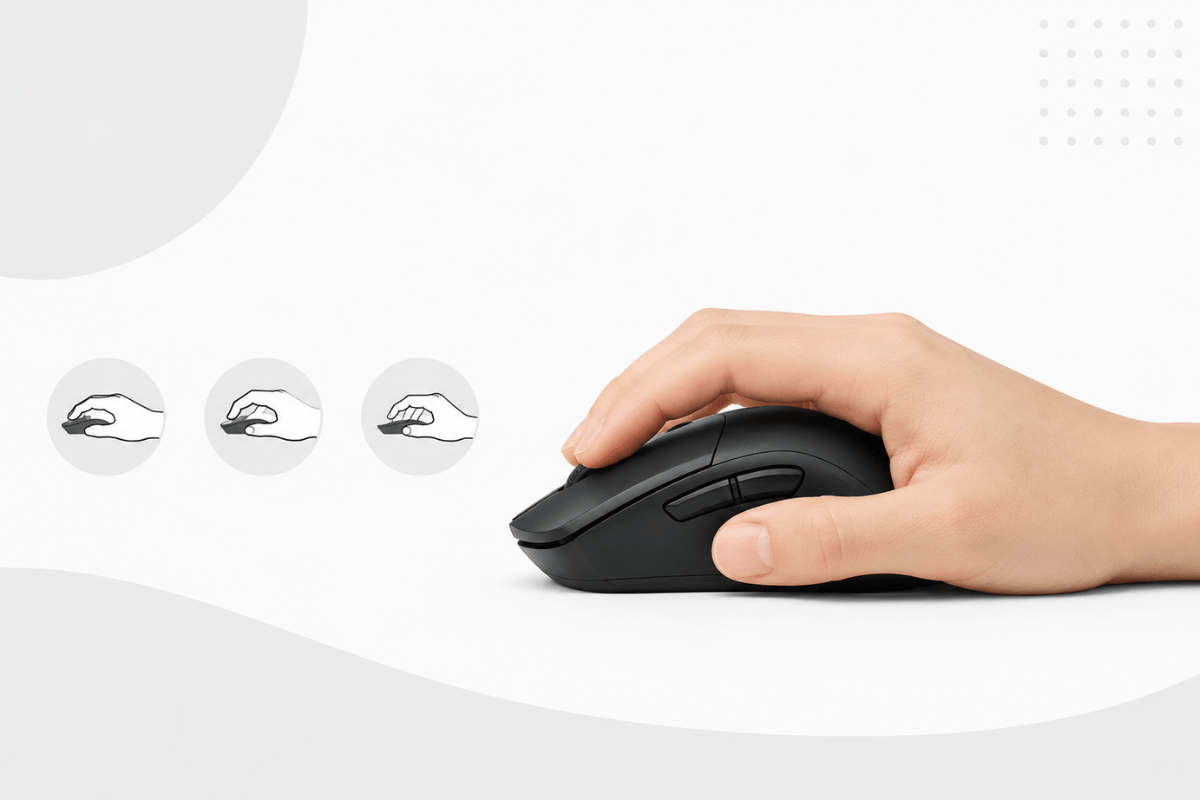
Choosing the right gaming mouse is about more than comparing DPI, polling rates, or RGB lighting. A mouse that matches your hand size and grip style can feel more comfortable, offer better control, and make fast movements easier during long gaming sessions. Whether you use a palm, claw, or fingertip grip, the ideal shape, size, and weight will be different. In this guide, you’ll learn how to choose a gaming mouse that fits your hand, play style, and preferred games.
Measure Your Hand Size
Before choosing a gaming mouse, measure your hand with a ruler or measuring tape. Measure the length from the tip of your middle finger to the first crease of your wrist. Then measure the width across the widest part of your palm, excluding the thumb. As a general guide, a hand length under 17.5 cm is considered small, 17.5–19.5 cm is medium, and over 19.5 cm is large.

| Hand length | General size |
| Under 17 cm | Small |
| 17–19 cm | Medium |
| Over 19 cm | Large |
When comparing mouse size, check the product’s length, width, and height instead of relying only on a small, medium, or large label. Remember that these measurements are only a starting point—the mouse shape, hump position, and your grip style will also affect how it feels in your hand.
Identify Your Mouse Grip Style
Your mouse grip style describes how your palm and fingers contact the mouse during play. Identifying it can help you choose a shape that supports natural movement and control.
Palm Grip
With a palm grip, most of your palm rests on the mouse while your fingers lie relatively flat. This grip often feels comfortable during longer sessions and generally works well with a longer, fuller mouse that supports the entire hand.
Claw Grip
With a claw grip, the rear of your palm touches the mouse while your fingers arch over the main buttons. This position offers a balance between stable tracking and quick clicks. A suitable claw grip mouse usually has a medium length and a noticeable rear hump for palm support.
Fingertip Grip
With a fingertip grip, only your fingertips control the mouse, while your palm remains raised. A shorter, lower-profile, lightweight gaming mouse can make quick movements and small aim adjustments easier with this grip.

Many players use a hybrid grip that combines elements of two styles. Treat these categories as a practical guide rather than strict rules, and focus on how you naturally hold the mouse while playing.
Hand size determines how much support you may need, while grip style influences the ideal mouse length, height, and hump position. Use the following combinations as a starting point when comparing mouse size:
| Hand size and grip | Recommended mouse characteristics |
| Small hand + palm grip | Small-to-medium mouse with full palm support |
| Large hand + palm grip | Longer, wider mouse with a fuller shape |
| Medium hand + claw grip | Medium mouse with a supportive rear hump |
| Large hand + claw grip | Medium-to-large mouse with enough width |
| Fingertip grip | Shorter, lighter mouse with a low profile |
A larger hand does not automatically require the largest gaming mouse. For example, a large-handed fingertip player may prefer a medium model because it leaves more room for finger movement. Compare the manufacturer’s dimensions with your measurements, but give equal attention to shape and grip style.
Choose the Right Shape and Weight
Ergonomic vs. Symmetrical Shape
An ergonomic gaming mouse usually has curved sides and more support for the thumb and palm. It often suits palm or relaxed claw grips, although comfort still depends on your hand shape. A symmetrical mouse has a more balanced design and may provide greater freedom of movement for claw and fingertip players. Remember that “ergonomic” does not automatically mean comfortable for everyone.

Mouse Weight
A lightweight gaming mouse can make fast swipes and repeated movements easier, which is useful for FPS players who use low sensitivity. However, some players prefer a medium or heavier mouse for a steadier, more controlled feel. Weight distribution also matters: a well-balanced mouse may feel easier to control than a lighter model with uneven weight.
Check the Gaming Features That Matter
Sensor and DPI

Most modern gaming mouse sensors provide accurate tracking, so a higher maximum DPI does not automatically mean better performance. Look for consistent tracking and a practical DPI range that lets you adjust sensitivity for different games.
Polling Rate

Mouse polling rate shows how often the mouse reports its position to the computer. A 1000Hz rate is sufficient for most players, while 4000Hz or 8000Hz may provide smoother input on compatible high-refresh-rate systems. Higher settings can also increase CPU usage and reduce wireless battery life.
Connectivity and Extra Buttons

A wired gaming mouse offers a stable connection without charging. A 2.4GHz wireless gaming mouse combines low-latency performance with greater freedom of movement, while Bluetooth is better suited to casual use and multi-device setups. Also consider programmable buttons, onboard memory, battery life, and software support.
Conclusion
Learning how to choose a gaming mouse starts with fit rather than specifications. Measure your hand, identify your grip style, and compare shape, size, and weight before focusing on DPI or polling rate. The right mouse should feel natural and provide confident control during both quick movements and longer gaming sessions. When possible, check the product dimensions and choose a retailer with a practical return policy.
FAQs
How do I know what mouse size is right for my hand?
Measure your hand and compare it with the mouse dimensions. Also consider your grip style, as it can affect the ideal size.
Which mouse grip is best for gaming?
No grip is best for everyone. Palm grip offers support, claw grip balances control and speed, and fingertip grip allows quicker movement.
Is a lightweight gaming mouse better?
Not always. A lightweight gaming mouse is easier to move quickly, but shape, balance, and comfort are more important.

Leave a comment
This site is protected by hCaptcha and the hCaptcha Privacy Policy and Terms of Service apply.