
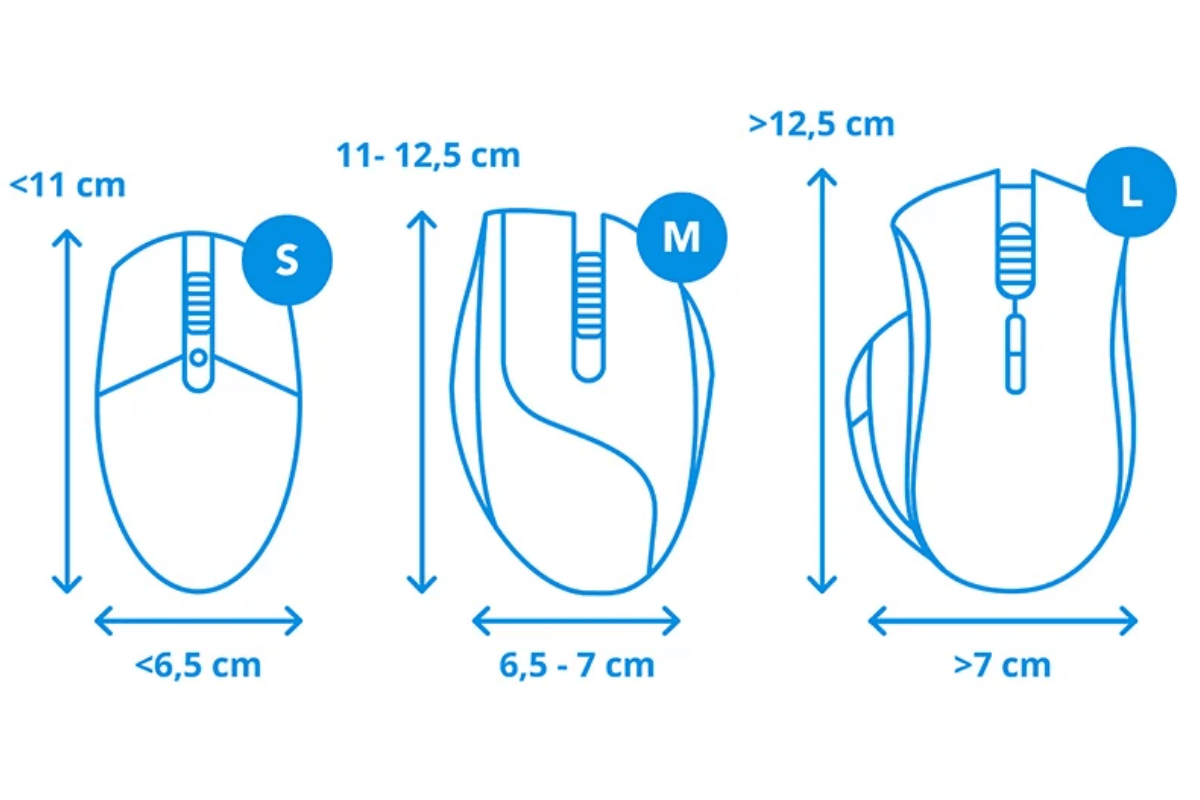
Measure your mouse hand before comparing sensors or polling rates. A mouse can have excellent electronics and still feel too short, too wide or awkward to lift. Among GamePeripherals mice for different hand sizes, your measurements are most useful as a starting point for comparing shape, button reach and the support you prefer.
You need a ruler or tape measure, a flat surface and a minute to record two numbers. Measure the hand you actually use for the mouse. Keep it relaxed, then use those figures alongside your normal grip rather than treating a size label as a guaranteed fit.
Measure hand length
Place your hand flat, palm down, with your fingers naturally together. Measure in a straight line from the wrist crease at the base of your palm to the tip of your middle finger. Do not start farther up your forearm or bend the tape over your knuckles.
Repeat the measurement and record it in millimeters or centimeters. For example, 19cm equals 190mm, or approximately 7.5 inches. Converting everything to millimeters makes it easier to compare your notes with mouse specifications, which are commonly listed that way.

Measure palm width consistently
For readers learning how to measure hand size for a gaming mouse, width is the second important measurement. Measure across the broadest part of your palm near the knuckles, excluding the thumb. Keep the hand relaxed instead of spreading your fingers to create the largest possible number.
Some sizing systems use a different width method, so always check their instructions before entering a number into a chart. A palm-width measurement without the thumb cannot be compared directly with a measurement that includes it. Write down your method as well as the result.
Add your normal grip style
With a palm grip, more of your palm rests on the shell. A claw grip uses bent fingers with contact toward the rear of the hand. A fingertip grip relies mainly on finger contact and leaves more room between the palm and shell. Observe your normal grip rather than forcing one for the test.
Shape affects each grip differently. A taller rear section may add palm contact but reduce the room for finger-led movement. A shorter mouse can offer more adjustment space but feel less supportive. RTINGS mouse comfort and grip testing illustrates why hand size and grip should be considered together.
Translate measurements into a shortlist
When exploring the GamePeripherals large-hand mouse range, compare listed length, maximum width and height with a mouse you already know. Record what you want to change: cramped fingers, excessive width, insufficient palm contact or hard-to-reach buttons. A familiar shape provides a more useful reference than a universal size chart.
Maximum shell width also differs from grip width where your thumb and fingers hold the mouse. Side curves and hump position can change the fit even when two products share similar dimensions. Photos from above and the side help you judge those differences.

Two larger shapes to compare
For hands that feel cramped on ordinary mice, the Darmoshark M9 Large Hands 8K Wireless Gaming Mouse is worth shortlisting. The store lists a 136.5mm symmetrical body and approximately 59g weight, giving it an unusually large footprint without a large increase in mass. Its guide targets hand lengths over 21cm as a starting recommendation. Consider it when you specifically want more body length and palm support.
Darmoshark M3 V2 and M3 Ultra share a listed 129.5 × 66 × 39mm footprint at approximately 58g. That makes the family a useful alternative if you want a substantial mouse but less length and height than M9. Choose the variant's electronics separately from the fit question.
| Listed specification | Darmoshark M3 series | Darmoshark M9 |
|---|---|---|
| Length | 129.5mm | 136.5mm |
| Maximum width | 66mm | 68.1mm |
| Height | 39mm | 43.5mm |
| Approximate weight | 58g | 59g |
| Store positioning | Medium to large hands | Extra-large hands |
These are product dimensions, not hand measurements or promised fit ranges. In particular, the extra 7mm of M9 length and 4.5mm of height can change contact points even though the listed weights differ by only about one gram.
Check reach and movement before deciding
During a hands-on fit check, click without stretching your fingers, use the side buttons without shifting your whole grip, and lift the mouse as you normally would. Check whether the shell presses into your palm or forces your fingers outward. Keep your usual sensitivity so the comparison reflects normal use.

If you are choosing a gaming mouse for medium to large hands, remember that extra width and height can matter as much as length. Keep your hand measurements, preferred grip and current mouse notes together when comparing options. Review the seller's return conditions before ordering, because photographs and measurements cannot fully predict how a shape will feel.
FAQ
Should I include my thumb in hand width?
Not with this method. Measure palm width excluding the thumb, and use charts with matching instructions.
Does a larger hand always need the largest mouse?
No. Grip style, finger movement and preferred palm contact also affect the choice.
Is there one ideal mouse-to-hand ratio?
No universal ratio guarantees comfort. Compare dimensions with a familiar mouse and test the shape when possible.

Leave a comment
This site is protected by hCaptcha and the hCaptcha Privacy Policy and Terms of Service apply.