
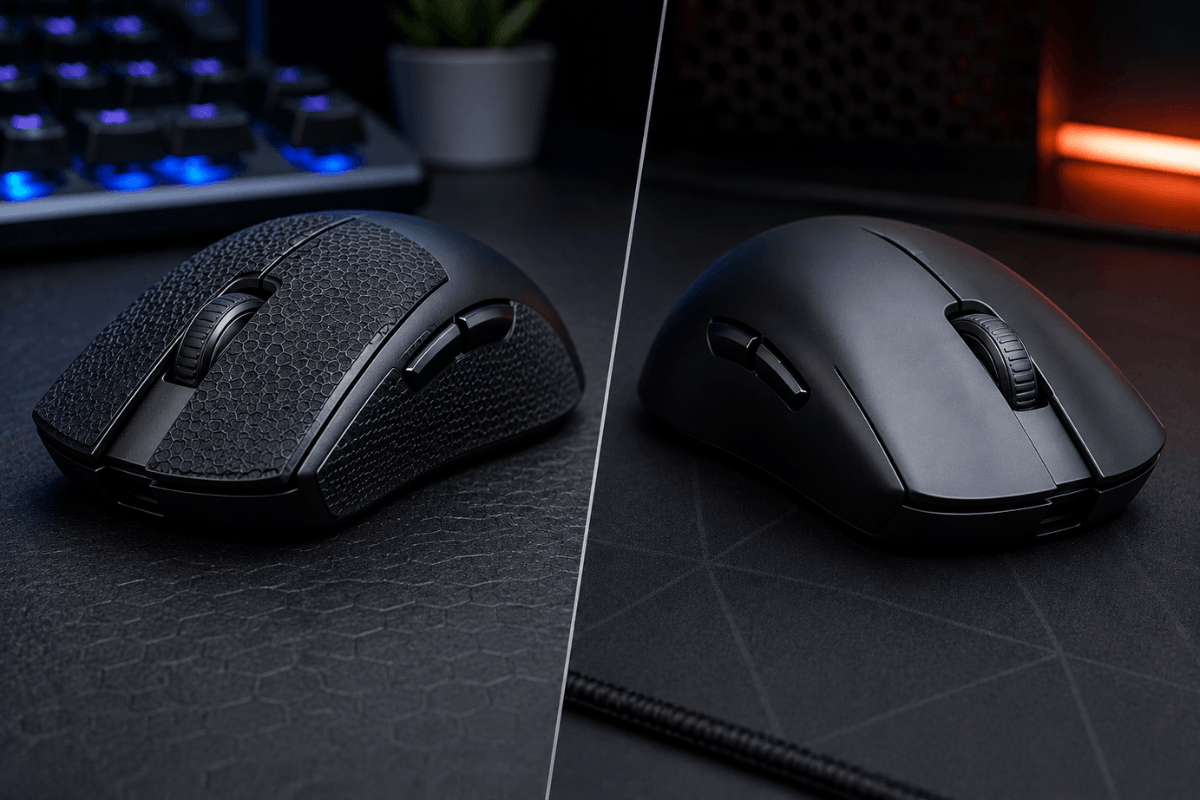
A gaming mouse can have a high-end sensor, lightweight shell, and responsive switches, but none of that changes one simple fact: your hand still needs to control it. For players whose fingers slip during fast movements, adding GamePeripherals mouse grip tape can create more friction between the hand and mouse, helping maintain a steadier grip during intense gaming sessions. For others, the clean factory shell already provides all the control they need.
So, is grip tape better? It depends on your hand moisture, grip style, mouse coating, and preference. Grip tape generally makes sense for players who struggle with slipping, while going without it is often better for gamers who prefer a smooth, lightweight, factory feel.
What Is Mouse Grip Tape?
Grip tape is a thin, textured adhesive material placed on contact areas of a mouse, typically the left and right sides and sometimes the main buttons. Its purpose is to increase friction where your fingers hold the mouse.

Some gaming mice have model-specific, pre-cut pieces, while universal sheets can be trimmed to fit different shapes. For players trying to improve their gaming mouse grip, the modification is relatively simple and does not require replacing the mouse itself.
Mouse Grip Tape vs No Grip Tape: Quick Comparison
| Feature | With Grip Tape | Without Grip Tape |
| Grip | Higher friction | Depends on factory coating |
| Sweaty hands | Usually easier to control | May become slippery |
| Original mouse feel | Changes slightly | Fully preserved |
| Weight | Adds a small amount | No added weight |
| Cleaning | Tape may need replacement | Shell is easier to wipe |
| Customization | High | Limited |
| Best for | Players needing extra traction | Players happy with stock coating |
Why Use Grip Tape on a Gaming Mouse?
The biggest reason is straightforward: traction. During long FPS sessions, sweat and natural skin oils can make a smooth mouse shell harder to hold securely. Dedicated grip products are designed to provide extra friction, and some use sweat-absorbent materials.

Extra traction can be particularly useful during fast flicks and repeated lift-and-reset movements. Instead of squeezing the mouse harder to keep it stable, a textured gaming mouse grip may help the fingers maintain their position and provide more consistent control during fast-paced gameplay.
Grip tape can also change how a smaller or smoother mouse feels in the hand. However, that does not mean it automatically improves aim. Sensor performance, sensitivity, mouse shape, hand size, mousepad, and technique still matter.
Does Your Mouse Grip Style Matter?
Yes. How much benefit you get from grip tape can depend on where your hand contacts the mouse.
Palm-grip players have relatively broad hand contact, so a well-textured stock shell may already provide enough stability. Fingertip players rely heavily on a few contact points, making side traction potentially more noticeable.

For a claw grip mouse, shape and hand size remain especially important because claw users typically arch their fingers while making lighter palm contact. Adding small grip sections to the sides can be useful when those contact points feel slippery without covering the entire mouse.
What About Sweaty Hands?
This is one of the strongest reasons to consider grip tape. Smooth plastic can become harder to control as moisture builds up during a long session.

Some dedicated gaming grip tapes use sweat-absorbent or anti-slip materials specifically to address this problem. These textured surfaces can help manage moisture and maintain friction between your fingers and the mouse, making them especially useful for players with sweaty hands during long or intense gaming sessions.
Still, the texture matters. A tape that feels secure to one player may feel too tacky or rough to another.
How to Apply Mouse Grip Tape Correctly
Start by cleaning the mouse surface so skin oil and dust do not weaken the adhesive. After the shell is dry, align each piece before pressing it firmly into place. Model-specific pre-cut tape is usually easier to position cleanly than a universal sheet.

Before applying grip tape, clean the mouse surface thoroughly to remove dust, oil, and moisture. Peel each pre-cut piece carefully from its backing, align it with the correct contact area, and press it firmly into place. Avoid repeatedly removing and reapplying the tape, as doing so may weaken the adhesive and reduce its grip over time.
FAQs
Is mouse grip tape worth it for gaming?
It can be worth using if your mouse becomes slippery or you feel you need to squeeze it tightly during fast movements. If the stock coating already feels secure, the difference may be less useful.
Does mouse grip tape improve aim?
It does not directly improve sensor accuracy or aiming skill. Better traction may help some players maintain a more consistent hold, but actual aim depends on many factors.
Can grip tape damage a gaming mouse?
Proper mouse-specific tape is designed to be removable, but adhesive behavior varies. Follow the tape manufacturer's instructions and avoid unsuitable adhesives that may leave residue.
How often should I replace mouse grip tape?
There is no universal replacement schedule. Replace it when the texture noticeably wears down, the surface becomes difficult to clean, or the adhesive edges begin lifting.

Leave a comment
This site is protected by hCaptcha and the hCaptcha Privacy Policy and Terms of Service apply.