
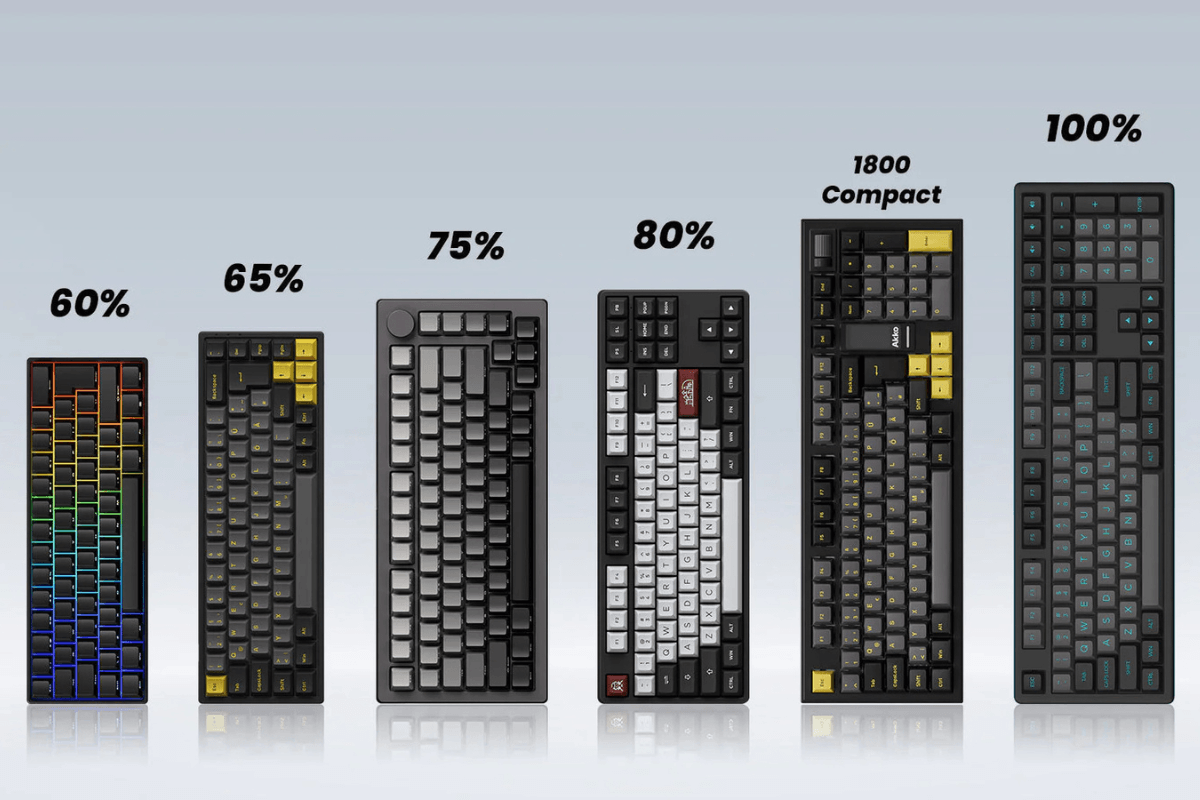
Choisir la bonne taille de clavier peut affecter considérablement votre expérience de jeu, l'espace sur votre bureau et votre confort au quotidien. Des formats compacts 60 % et 65 % aux designs plus polyvalents 75 % et TKL, chaque taille offre un équilibre différent entre fonctionnalité et commodité. Dans ce guide, nous comparerons ces quatre tailles de clavier populaires pour vous aider à trouver celle qui convient le mieux à votre configuration de jeu.
Claviers 60 % – Les plus petits et les plus compacts
Un clavier 60 % est l'un des formats de clavier mécanique les plus compacts, ne conservant que les touches alphanumériques essentielles tout en supprimant la rangée de touches de fonction dédiée, les touches fléchées et le groupe de navigation. Son encombrement réduit laisse nettement plus d'espace sur le bureau pour les mouvements de la souris, ce qui le rend particulièrement populaire auprès des joueurs de FPS et des joueurs compétitifs.

Le principal avantage d'un clavier 60 % est sa portabilité et son design minimaliste. Cependant, les touches manquantes peuvent nécessiter un certain temps d'adaptation, car des fonctions comme les touches fléchées et F1–F12 sont généralement accessibles via des combinaisons avec la touche Fn. Un clavier 60 % convient mieux aux joueurs qui privilégient une configuration épurée, un espace de souris maximal et un format compact plutôt qu'un accès rapide aux touches dédiées.
Claviers 65 % – Compacts sans perdre les touches fléchées
Un clavier 65 % offre un équilibre entre compacité et fonctionnalité quotidienne. Par rapport à une disposition 60 %, il ajoute des touches fléchées dédiées et quelques touches de navigation, tout en ne comportant pas de rangée de fonctions. Cela donne aux joueurs un accès plus pratique aux touches couramment utilisées sans occuper beaucoup d'espace de bureau supplémentaire.

Pour le jeu, un clavier 65 % offre beaucoup d'espace pour les mouvements de la souris tout en étant plus facile à utiliser pour la frappe et la navigation quotidiennes qu'un modèle 60 %. Sa disposition compacte mais pratique en fait un choix populaire pour les utilisateurs qui veulent un clavier qui fonctionne bien à la fois pour le jeu et l'usage quotidien. Si vous voulez les avantages d'un clavier plus petit sans renoncer aux touches fléchées dédiées, le 65 % est souvent le point idéal.
Claviers 75 % – Plus de fonctionnalités, toujours compacts
Un clavier 75 % ajoute plus de fonctionnalités tout en conservant un encombrement relativement compact. Il comprend généralement des touches fléchées dédiées, une rangée de fonctions complète et plusieurs touches de navigation, tout en supprimant le pavé numérique. Cela le rend plus polyvalent qu'un clavier 65 % sans occuper autant d'espace de bureau qu'un clavier TKL.

Pour les joueurs qui utilisent également leur clavier pour le travail, les études ou les tâches quotidiennes, un clavier 75 % dont la disposition peut être un excellent compromis. Vous bénéficiez d'un accès rapide aux touches F1–F12 et de navigation tout en laissant beaucoup de place pour votre souris. C'est un excellent choix pour les utilisateurs qui souhaitent plus de fonctionnalités sans sacrifier trop d'espace de bureau.
80% | Claviers TKL – La meilleure disposition traditionnelle
Un clavier TKL (Tenkeyless) conserve presque tout ce que l'on trouve sur un clavier traditionnel pleine grandeur, à l'exception du pavé numérique. Il comprend des touches fléchées dédiées, une rangée complète de touches de fonction et des touches de navigation, ce qui le rend familier et pratique à la fois pour les jeux et pour un usage quotidien.

Par rapport aux formats plus compacts, un clavier tenkeyless occupe plus d'espace sur le bureau, mais offre un accès plus facile aux touches essentielles sans l'encombrement d'un clavier pleine grandeur. Pour les joueurs qui tapent aussi fréquemment, travaillent ou ont besoin d'un accès rapide aux touches de fonction et de navigation, le TKL reste un choix pratique et polyvalent. Il convient particulièrement aux utilisateurs qui préfèrent une disposition de clavier traditionnelle sans pavé numérique.
60% vs 65% vs 75% vs TKL : comparaison côte à côte
Chaque taille de clavier offre un équilibre différent entre compacité et fonctionnalité. Le tableau ci-dessous fournit une comparaison rapide pour vous aider à voir les principales différences en un coup d'œil.
|
Taille du clavier |
Touches fléchées |
Rangée de touches de fonction |
Espace de bureau |
Idéal pour |
|
60 % |
Non |
Non |
Le plus petit |
Jeux FPS, configurations minimalistes |
|
65% |
Oui |
Non |
Très petit |
Gaming et usage quotidien |
|
75% |
Oui |
Oui |
Petit |
Jeux, travail et productivité |
|
TKL |
Oui |
Oui |
Moyen |
Jeux et frappe traditionnelle |
En général, les claviers 60 % sont les meilleurs lorsque l'économie d'espace de bureau est la priorité absolue, tandis que les claviers 65 % offrent un meilleur équilibre en ajoutant des touches fléchées dédiées. Les claviers 75 % offrent encore plus de fonctionnalités sans devenir trop grands, et les claviers TKL sont idéaux pour les utilisateurs qui préfèrent une disposition familière et traditionnelle. Votre choix dépend en fin de compte des touches que vous utilisez le plus et de l'espace de bureau que vous souhaitez conserver pour votre souris.
Quelle taille de clavier devriez-vous choisir ?

La meilleure taille de clavier dépend de vos habitudes de jeu, de l'espace de bureau et de la fréquence à laquelle vous utilisez des touches au-delà de la zone de saisie principale. Choisissez un clavier 60 % si vous souhaitez la plus petite empreinte et un espace maximal pour la souris, en particulier pour les jeux FPS. Choisissez 65 % si vous voulez une configuration compacte mais avez toujours besoin de touches fléchées dédiées. Choisissez 75 % si vous utilisez régulièrement les touches de fonction et de navigation tout en gardant une configuration relativement compacte. Choisissez TKL si vous préférez une disposition traditionnelle et souhaitez un accès facile à la plupart des touches sans l'encombrement supplémentaire d'un clavier pleine taille. Pour la plupart des joueurs à la recherche d'un équilibre entre fonctionnalité et espace de bureau, GamePeripherals équipement de jeu peut être associé à un clavier 65 % pour une configuration pratique et bien équilibrée.

Laisser un commentaire
Ce site est protégé par hCaptcha, et la Politique de confidentialité et les Conditions de service de hCaptcha s’appliquent.