
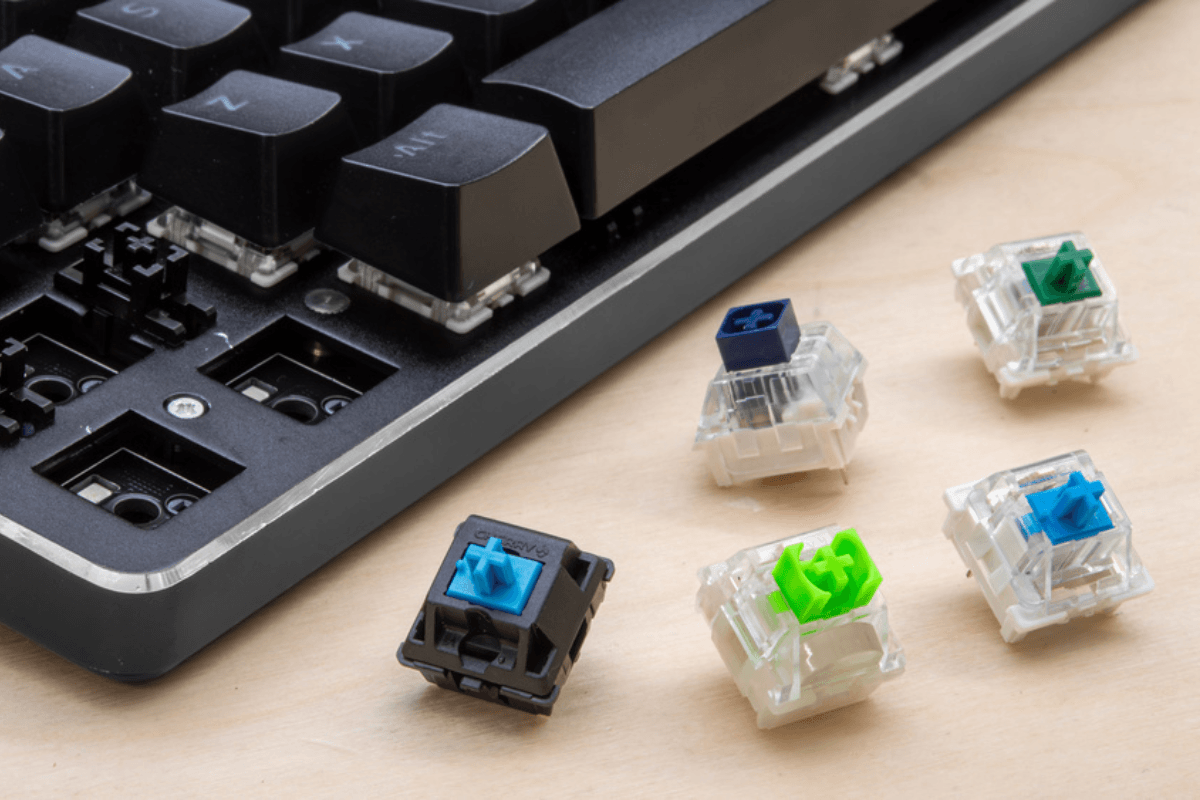
Si vous êtes déjà passé d'un clavier de bureau standard à un clavier mécanique, l'une des premières choses que vous avez probablement remarquées est à quel point chaque frappe semblait différente. Certains interrupteurs sont fluides et légers, d'autres offrent une bosse perceptible, et certains produisent un clic distinct à chaque pression.
Ces différences proviennent des minuscules mécanismes situés sous chaque touche. Comprendre comment les interrupteurs de clavier mécanique fonctionnent peut grandement faciliter le choix d'un clavier adapté à votre façon de jouer, de taper et d'utiliser votre PC au quotidien.
Qu'est-ce qu'un interrupteur de clavier mécanique ?
Un interrupteur mécanique est le mécanisme individuel situé sous chaque touche d'un clavier mécanique. Au lieu d'utiliser une seule membrane en caoutchouc sur l'ensemble du clavier, les claviers mécaniques traditionnels donnent à chaque touche son propre mécanisme d'interrupteur.
Lorsque vous appuyez sur une touche, les composants à l'intérieur de l'interrupteur se déplacent jusqu'à ce que l'entrée atteigne son point d'actionnement. Le clavier détecte alors cette entrée et envoie la commande correspondante à votre ordinateur.
Cette conception à switch individuel est l'une des raisons pour lesquelles les claviers mécaniques peuvent offrir autant d'expériences de frappe différentes. Changer le switch peut affecter la fluidité, la résistance, le son, le retour tactile et la distance à parcourir avant qu'une touche ne s'actionne.
Que contient un switch de clavier mécanique ?
Bien que les conceptions des switches varient, un switch mécanique typique contient plusieurs composants clés :
- Tige : La pièce mobile qui descend lorsque vous appuyez sur la touche.
- Ressort : Offre une résistance et ramène la touche à sa position de repos.
- Contacts métalliques : Enregistrent l'appui lorsque le switch atteint son point d'actionnement.
- Boîtier supérieur : Maintient et guide la partie supérieure du mécanisme.
- Boîtier inférieur : Soutient les composants internes et relie le switch au clavier.

La forme et le matériau exacts de ces composants peuvent modifier la sensation d'un switch. Même deux switches qui semblent presque identiques de l'extérieur peuvent procurer une sensation nettement différente dès que vous commencez à taper ou à jouer.
Que se passe-t-il lorsque vous appuyez sur une touche ?
Un appui commence lorsque votre doigt enfonce le capuchon de touche vers le bas. Le capuchon déplace la tige, qui compresse le ressort à l'intérieur du switch.
Alors que la tige continue de descendre, l'interrupteur finit par atteindre son point d'actionnement. Dans une conception mécanique conventionnelle, le mouvement à l'intérieur de l'interrupteur amène les contacts électriques à enregistrer la frappe. L'électronique du clavier détecte ce changement et envoie la frappe à votre ordinateur.
Il n'est pas nécessaire d'enfoncer la touche jusqu'en bas pour qu'elle soit enregistrée. C'est pourquoi la pré-course et la course totale sont des caractéristiques différentes : la pré-course décrit la distance avant l'actionnement, tandis que la course totale décrit la distance totale que l'interrupteur peut parcourir.

Lorsque vous comparez des claviers sur la GamePeripherals Online Store, ces caractéristiques d'interrupteur méritent d'être prises en compte au même titre que la disposition, la connectivité, le design des keycaps et d'autres fonctionnalités. La bonne combinaison dépend largement de la sensation que vous préférez pour votre clavier.
Interrupteurs linéaires, tactiles et à clic
La plupart des interrupteurs mécaniques conventionnels se répartissent en trois grandes catégories : linéaires, tactiles et à clic.
Interrupteurs linéaires
Les interrupteurs linéaires se déplacent de manière fluide du début de la frappe jusqu'en bas, sans bosse tactile intentionnelle. Leur course régulière les rend populaires auprès des joueurs qui préfèrent des saisies fluides et répétées.
Ils ne sont cependant pas automatiquement plus rapides que les autres types d'interrupteurs. La latence réelle d'un clavier dépend de bien plus que de la seule sensation de l'interrupteur.
Interrupteurs tactiles
Les switches tactiles offrent un ressaut perceptible lors de l'appui. Ce retour vous permet de sentir le moment tactile du switch sans nécessiter de clic sonore.
Beaucoup de personnes apprécient les switches tactiles pour un usage mixte jeu et frappe, car ils offrent un retour physique tout en étant généralement moins intentionnellement cliquables que les switches clicky.
Switches clicky
Les switches clicky combinent un retour tactile avec un clic sonore délibéré. Ils offrent une expérience de frappe très distinctive, que certains utilisateurs adorent et que d'autres trouvent trop bruyante.
Ils plaisent souvent à ceux qui aiment un retour marqué à chaque frappe, mais le bruit peut être un critère important dans les bureaux, les pièces partagées ou les configurations nocturnes.

Les switches affectent-ils les performances en jeu ?
Les switches peuvent influencer la réactivité et le confort d'un clavier, mais ils ne représentent qu'une partie des performances en jeu. Le firmware, le comportement de scan, le type de connexion, la mise en œuvre du polling et d'autres éléments électroniques peuvent également contribuer à la latence d'entrée.
Pour les jeux rapides, certains joueurs apprécient les switches linéaires fluides, car les mouvements répétés peuvent sembler sans effort. D'autres préfèrent les switches tactiles, car le retour physique rend chaque appui plus perceptible. Le meilleur choix dépend finalement du type de retour et de résistance qui vous semble naturel.
Si vous recherchez un nouveau clavier de gaming, GamePeripherals.com propose des claviers mécaniques de différentes marques, offrant aux joueurs plus d'options pour comparer les types de switches, les dispositions, la connectivité et le design global. Lorsque vous choisissez parmi claviers mécaniques GamePeripherals, considérez le clavier dans son ensemble plutôt que de vous concentrer uniquement sur le switch, car la bonne combinaison de caractéristiques peut faire une plus grande différence pour votre expérience de jeu globale.
FAQ
Qu'est-ce que le point d'actionnement d'un switch de clavier ?
Le point d'actionnement est le moment, lors d'une pression de touche, où le clavier enregistre l'entrée. Il se produit avant que le switch n'atteigne nécessairement le fond de sa course.
Pourquoi les switches mécaniques offrent-ils une sensation différente ?
Le poids du ressort, la géométrie de la tige, la conception du boîtier, les matériaux, la lubrification, les mécanismes tactiles et d'autres détails de construction peuvent tous influencer la sensation d'un switch.
Peut-on remplacer les switches d'un clavier mécanique ?
Si le clavier prend en charge les switches hot-swap, les switches compatibles peuvent généralement être retirés et remplacés sans soudure. Les claviers soudés nécessitent des outils supplémentaires et un travail technique.

Laisser un commentaire
Ce site est protégé par hCaptcha, et la Politique de confidentialité et les Conditions de service de hCaptcha s’appliquent.