
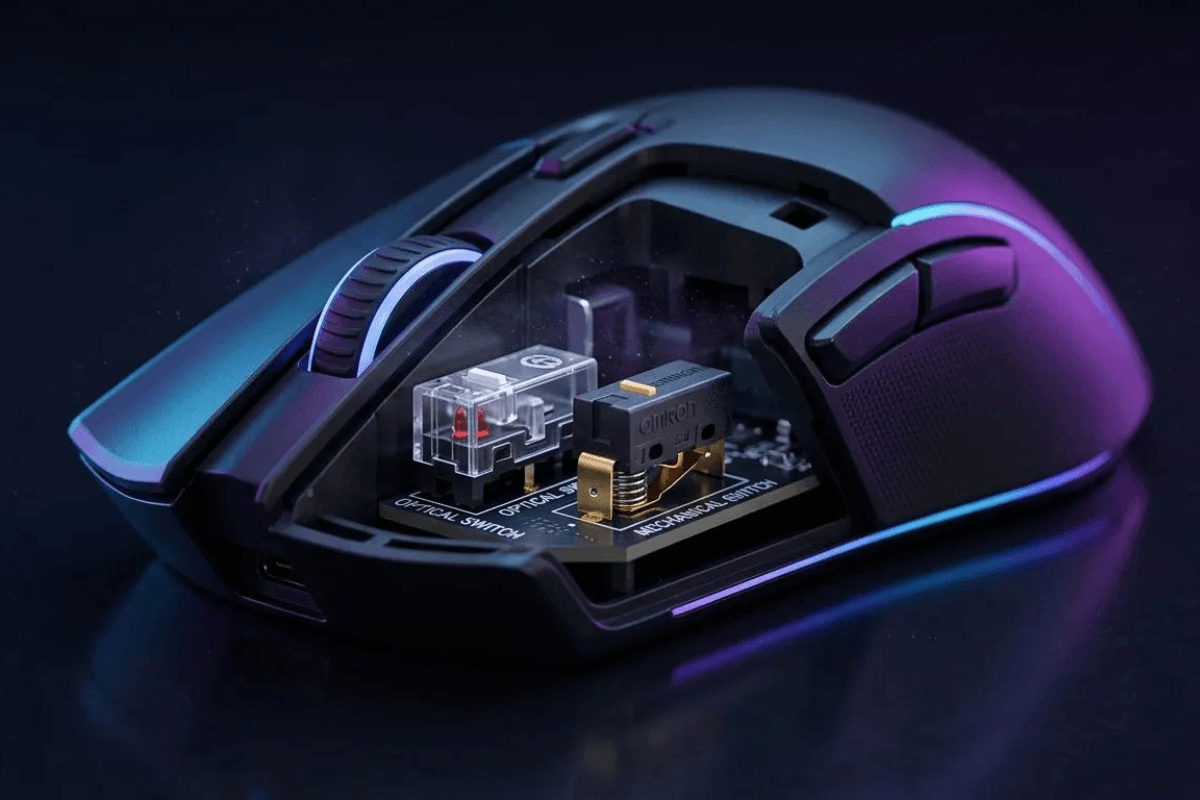
Les switchs situés sous les boutons de votre souris jouent un rôle important dans la façon dont chaque clic est ressenti et enregistré. Que vous jouiez à des FPS compétitifs, naviguiez sur le web ou travailliez pendant des heures, la conception du switch peut influencer le retour, la réactivité et la fiabilité à long terme.
Lorsque l'on compare les switchs optiques aux switchs mécaniques de souris, la principale différence réside dans la façon dont chaque type détecte un clic. Les switchs mécaniques utilisent des contacts électriques physiques, tandis que les switchs optiques utilisent une détection par lumière. Aucune de ces technologies n'est automatiquement le meilleur choix pour tous les joueurs ; comprendre leurs forces et leurs limites peut vous aider à choisir en toute confiance.
Que sont les switchs mécaniques de souris ?
Les switchs mécaniques de souris utilisent un mécanisme à contact physique pour enregistrer l'appui sur un bouton. Lorsque vous cliquez, des composants internes se déplacent et les contacts électriques se ferment, ce qui permet à la souris de détecter l'entrée.
Cette conception traditionnelle est largement utilisée dans les souris de gaming et disponible en de nombreuses variantes. Différents switchs peuvent offrir des forces d'actionnement, des sons de clic, des retours tactiles et des durées de vie nominales distincts.

Pour les joueurs qui apprécient un clic net et familier, les interrupteurs mécaniques de souris restent une option populaire. Leurs performances dépendent de l'interrupteur spécifique, de la construction de la souris, du firmware et de la façon dont le fabricant implémente le mécanisme du bouton.
Que sont les interrupteurs optiques de souris ?
Les interrupteurs optiques détectent l'actionnement à l'aide d'un mécanisme basé sur la lumière plutôt que de s'appuyer sur la même fermeture de contact électrique utilisée par les interrupteurs mécaniques conventionnels. Une pression sur le bouton modifie le trajet de la lumière, permettant au capteur d'enregistrer le clic.
Comme les conceptions optiques ne dépendent pas de contacts électriques physiques pour l'actionnement, elles peuvent éviter le comportement de rebond de contact associé aux interrupteurs traditionnels. Cependant, le bouton contient toujours des composants mécaniques mobiles, et sa sensation dépend de la conception globale.

De nombreuses souris de jeu modernes utilisent des interrupteurs optiques de souris pour offrir un actionnement constant et réduire la dépendance au rebond de contact conventionnel. Les performances et la durabilité exactes varient encore selon le modèle.
Optique vs mécanique : les principales différences
| Caractéristique | Interrupteurs optiques | Interrupteurs mécaniques |
| Actionnement | Détection basée sur la lumière | Contacts électriques physiques |
| Sensation du clic | Varie selon la conception | Varie selon la conception |
| Rebond de contact | Pas de rebond de contact électrique conventionnel | Peut nécessiter une gestion anti-rebond |
| Durabilité | Pas d'usure des contacts d'actionnement | Les contacts peuvent s'user avec le temps |
| Risque de double-clic | Évite les problèmes liés au rebond de contact | Peut développer des problèmes liés aux contacts |
| Performances en jeu | Dépend de l'implémentation | Dépend de l'implémentation |
| Disponibilité | Courant dans de nombreuses souris de jeu modernes | Largement disponible dans toutes les gammes de prix |
Le tableau met en évidence des différences générales plutôt que des garanties. Un commutateur mécanique bien conçu peut offrir d'excellentes performances, tandis qu'un commutateur optique peut tout de même avoir un ressenti de clic qui ne correspond pas à vos préférences.
Ressenti du clic et performances de jeu
Le ressenti du clic est souvent plus perceptible que la technologie sous-jacente. Certains joueurs préfèrent un clic ferme et net avec un retour clair, tandis que d'autres apprécient une pression de bouton plus légère et plus fluide.
Les commutateurs optiques sont parfois présentés comme plus rapides, car ils ne nécessitent pas l'anti-rebond des contacts électriques classiques. Cela peut être un avantage dans certaines implémentations, mais cela ne signifie pas que chaque souris optique a une latence totale de clic inférieure à celle de chaque souris mécanique.

La réactivité globale dépend également du firmware de la souris, de la conception des boutons, du traitement du capteur, du taux d'interrogation et de la connexion. Lorsque vous choisissez parmi souris gaming GamePeripherals, comparez la souris dans son ensemble plutôt que de considérer la technologie des commutateurs comme la seule spécification de performance.
Pour le jeu compétitif, une forme confortable et des clics fiables sont généralement plus importants que le choix d'un type de commutateur fondé uniquement sur des arguments marketing.
Durabilité et problèmes de double-clic
Les interrupteurs mécaniques peuvent subir une usure de leurs contacts électriques avec le temps. Le rebond de contact est une caractéristique normale de la commutation mécanique, et le firmware utilise généralement un traitement anti-rebond pour éviter qu'un appui soit interprété comme plusieurs clics.
À mesure qu'un interrupteur vieillit ou développe des problèmes, des doubles clics involontaires peuvent survenir. Cependant, tous les interrupteurs mécaniques ne développent pas ce problème, et la qualité, l'utilisation, l'environnement et la mise en œuvre influencent tous la longévité.

Les interrupteurs optiques évitent le même mécanisme de rebond de contact électrique, ce qui peut réduire une cause fréquente de doubles clics involontaires. Ils ne sont toutefois pas totalement à l'abri d'une défaillance. Les pièces mécaniques, les structures de bouton, les capteurs et l'électronique peuvent toujours développer des pannes.
Les durées de vie en clics annoncées par les fabricants peuvent être utiles pour comparer, mais ce sont des spécifications de laboratoire et non des garanties de la durée de vie d'une souris dans un usage quotidien.
Lequel choisir ?
Choisissez une souris à interrupteurs optiques si vous appréciez l'actionnement optique et souhaitez éviter les problèmes conventionnels liés au rebond de contact. Par exemple, la EWEADN Z7 MASTER mérite d'être considérée pour les joueurs qui préfèrent les interrupteurs optiques et une souris sans fil axée sur la performance. Son design en fibre de carbone en fait également une option intéressante pour les joueurs qui privilégient une construction légère et une apparence distinctive.
Si vous préférez le retour tactile familier des interrupteurs traditionnels, la SKN ZhuQue JingTan offre une alternative à interrupteurs mécaniques. Sa construction en fibre de carbone et sa conception sans fil légère la rendent adaptée aux joueurs qui recherchent une souris réactive tout en conservant la sensation de clic associée aux interrupteurs mécaniques.
Lorsque vous comparez ces deux options, tenez compte de votre sensation de clic préférée, de la taille de votre main, de votre style de prise en main et des spécifications globales de la souris. Aucun type d'interrupteur n'est universellement meilleur, alors choisissez le modèle qui vous semble le plus naturel pour votre configuration de jeu.
FAQ
Les interrupteurs optiques de souris sont-ils plus rapides que les interrupteurs mécaniques ?
Les interrupteurs optiques peuvent éviter le rebond des contacts électriques conventionnels, mais la latence totale du clic dépend de la mise en œuvre complète de la souris. Ils ne sont pas automatiquement plus rapides que tous les modèles mécaniques.
Les interrupteurs optiques de souris peuvent-ils produire un double-clic ?
Les interrupteurs optiques évitent les double-clics liés au rebond des contacts conventionnels, mais d'autres défauts matériels ou électroniques peuvent toujours provoquer des entrées involontaires. Ils ne sont pas garantis exempts de défaillance.
Quels interrupteurs sont les meilleurs pour un usage quotidien ?
Les deux conviennent à un usage quotidien. Le confort, la force de clic, le bruit, la forme et la qualité globale de la souris sont généralement plus importants que la seule technologie d'actionnement.


Laisser un commentaire
Ce site est protégé par hCaptcha, et la Politique de confidentialité et les Conditions de service de hCaptcha s’appliquent.