
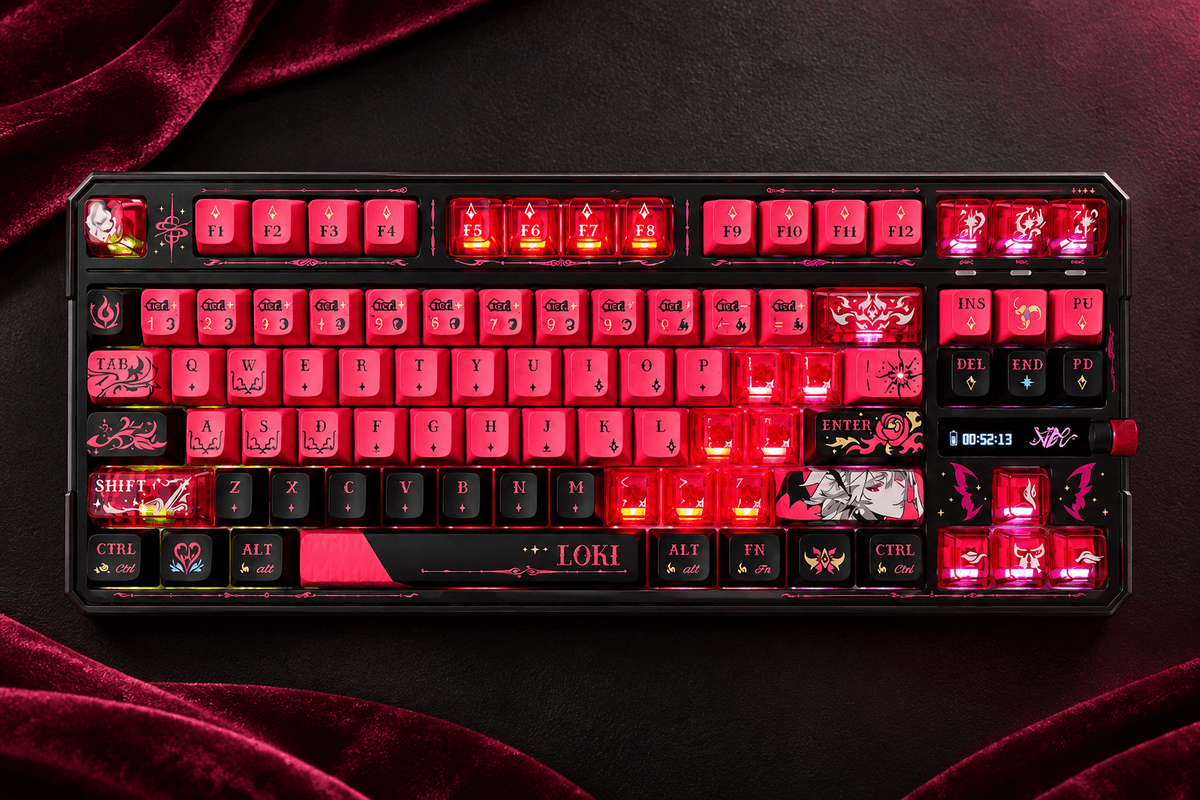
A series name can hide meaningful configuration differences. The VALKYRIE V87 V2 Series Wireless Mechanical Keyboard offers themed TKL options with fast wired and receiver-based operation, but the standard V2 and MAX V2 versions do not have the same screen or battery specification. That distinction is central to understanding what makes this product listing worthwhile.
This review uses the store's specifications and configuration images. The page also uses VK87 naming in its detailed material, while the storefront product title is V87 V2 Series. The focus here is the listed standard and MAX choices, with practical guidance on which features matter and which advertised endurance figures need their low-power context.
A TKL format with stronger visual customization
The keyboard keeps a function row and navigation area while omitting a number pad. That is a useful fit for a gaming desk where mouse space matters but everyday shortcuts should remain familiar. A knob gives you a physical control, while the themed keycaps and lighting make the board more expressive than a plain office-oriented model.
Among GamePeripherals wireless desktop keyboards options, the V87 V2 Series is interesting because it can suit both routine work and a more personal desktop style. Loki, Merlin, Dracula, Thor and other themed configurations are listed alongside more restrained standard colors. Look at the exact cap profile and legend placement in the selected option, rather than assuming every theme has the same typing geometry.

Standard V2 and MAX V2 are different purchases
The standard V2 specification lists a 10000mAh battery without the LCD feature. MAX V2 configurations list a 12000mAh battery and an LCD, with 21 replacement keycaps included in the described MAX package. Those differences can influence both the price decision and how much visual customization you will actually use.
If you want a wireless TKL keyboard with LCD screen, make sure you choose the MAX configuration rather than relying on the series-level photographs. Someone who mainly needs the layout, knob and connection options may prefer a standard version. An extra screen is useful only if its functions and appearance justify the additional feature for your own desk.
Dual 8K reporting for gaming connections
The listing describes 8K reporting over wired USB and 2.4GHz wireless, with a stated latency claim of at most 0.1ms. Treat that latency as a product-page specification, not an independently measured complete-system result. At 8,000Hz, reports are spaced by 0.125ms, while sensing, game processing and display behavior remain separate parts of the response chain.
Bluetooth provides another connection route, particularly for convenient secondary-device use. It should not inherit the receiver's 8K specification. Place the receiver sensibly, test higher polling in the games you use and keep a stable baseline profile. A consistent connection and comfortable layout remain more useful than a number that is attractive only on the listing.

Low-power technology is not a silent-switch promise
The page describes Static-Core or Silent-Core power-saving behavior in Bluetooth mode and advertises very long endurance figures in that context. The name concerns low-power operation, not a guarantee that the keyboard's switches are acoustically silent. It is important to keep that distinction clear when choosing a board for a shared room.
Within GamePeripherals TKL mechanical keyboards choices, the V87 V2 Series offers a useful mix of familiar keys and configuration variety. The longest battery figures apply to the stated Bluetooth power-saving conditions, not automatically to 8K receiver gaming with RGB and the display active. Use the battery capacity as a planning detail, then evaluate endurance under the settings you actually prefer.
| Feature | What to expect | Buying consideration |
|---|---|---|
| Standard V2 | 10000mAh; no LCD listed | Suitable when core keyboard features are enough |
| MAX V2 | 12000mAh, LCD, 21 replacement caps described | Choose this version if the screen matters |
| Gaming reporting | Dual 8K wired and 2.4GHz | Bluetooth is not the same performance mode |
| Longest endurance claims | Bluetooth power-saving context | Not a promise for 8K RGB gaming |
Construction and switch choices shape daily use
A gasket structure, five dampening layers and a flexible PC plate provide the listed typing foundation. Hot-swap support offers a route to compatible mechanical switch changes later. The page references multiple KTT and HUANO configurations, so the exact factory switch should be checked before buying for feel or sound.
Keycap materials and profiles also vary, including translucent PC and other themed descriptions across the listing. That makes the complete configuration more meaningful than the series name alone. Try the stock board before modifying several parts at once, and remember that case materials, caps, switches and typing force all contribute to the result you hear and feel.

Software should support a clear daily routine
Web and desktop configuration offer remapping and lighting controls, with advanced features such as Snap Key/SOCD, MDS and MT described in the page material. These functions need individual evaluation, and competitive-game rules should be checked before enabling movement-related behavior. This is a conventional mechanical series, not a magnetic travel-sensing board.
When considering an 8K mechanical keyboard with long battery life, the V87 V2 deserves a close look if its standard or MAX configuration matches your priorities. Keep a simple work profile and a separate gaming profile where appropriate. A useful knob, familiar keys and stable settings can add more everyday value than filling the utility with features you rarely need.
The buying verdict
Choose standard V2 if you mainly want the TKL layout, knob, wireless options and listed performance features. Choose MAX V2 if the LCD, larger listed battery and included replacement caps are genuinely useful to you. Both decisions should begin with the exact selected variant rather than a general series image.
The V87 V2 Series is particularly attractive for a user who wants a themed board that still works as a practical desktop tool. It is less suited to someone who needs a built-in number pad or magnetic actuation adjustment. Confirm the switch, screen and battery details before ordering, then start with a stable setup and customize gradually.
FAQ
Does every V87 V2 version have an LCD?
No. The page associates the LCD with MAX V2 configurations.
Does Silent-Core mean silent switches?
No. The term refers to power-saving technology, not guaranteed quiet acoustics.
Are the longest battery figures for 8K gaming?
No. They are tied to the stated low-power Bluetooth conditions.


Laisser un commentaire
Ce site est protégé par hCaptcha, et la Politique de confidentialité et les Conditions de service de hCaptcha s’appliquent.