
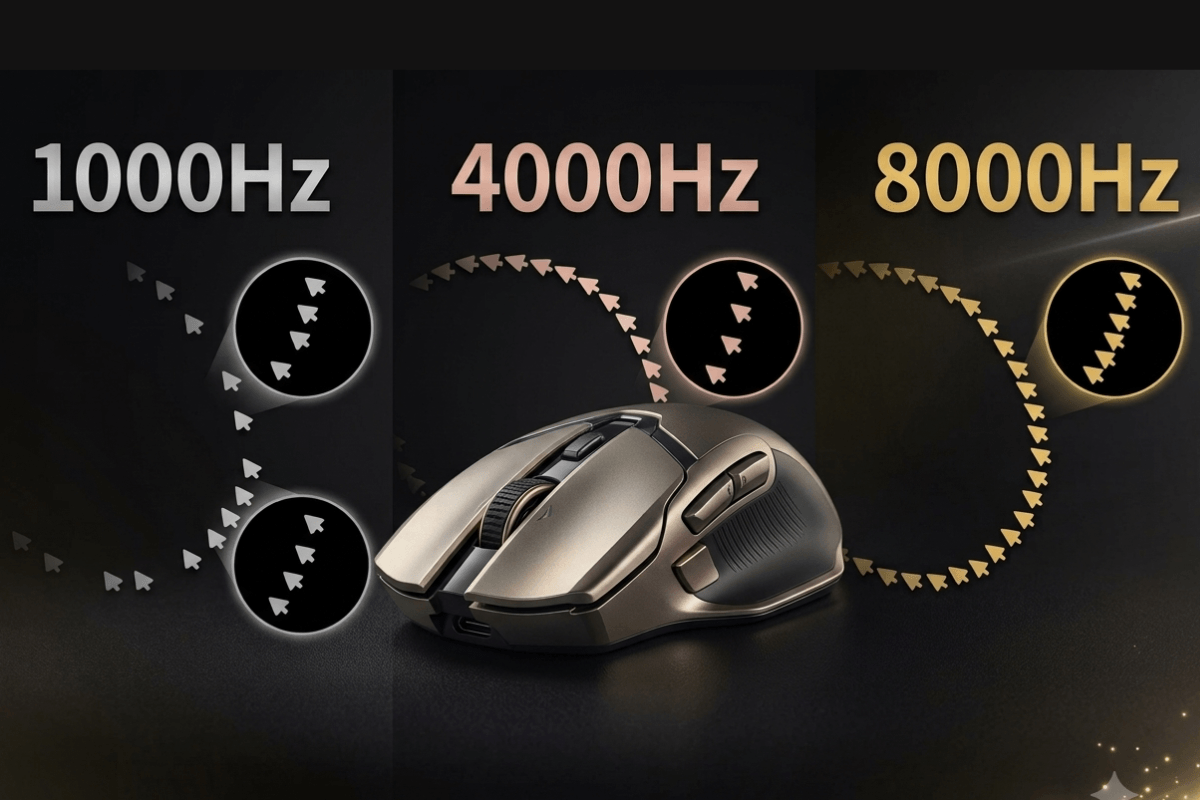
Gaming mice now offer polling rates from 1000Hz to 8000Hz, promising faster and smoother input. However, a higher number does not automatically deliver a noticeable advantage on every PC or in every game. The best mouse polling rate depends on your monitor, frame rate, CPU performance, and whether you use a wireless mouse. This guide compares 1000Hz, 4000Hz, and 8000Hz to help you choose the right setting for your gaming setup.
What Is Mouse Polling Rate?
Mouse polling rate measures how often a mouse sends position and button data to the computer each second, expressed in hertz (Hz). At 1000Hz, a mouse can report up to 1,000 times per second, creating a theoretical interval of 1ms. The formula is:
Reporting interval = 1000 ÷ polling rate
Therefore, 4000Hz equals 0.25ms and 8000Hz equals 0.125ms. A higher rate provides more frequent input updates, but these figures do not represent total mouse latency, which also depends on the sensor, connection, firmware, computer, and game.
1000Hz vs 4000Hz vs 8000Hz: Key Differences

| Polling Rate | Reporting Interval | Best For |
| 1000Hz | 1ms | Most gaming setups |
| 4000Hz | 0.25ms | Competitive and high-refresh-rate gaming |
| 8000Hz | 0.125ms | High-end competitive setups |
1000Hz Polling Rate
A 1000Hz polling rate is the standard choice for modern gaming mice. It provides responsive input for most casual and competitive players while keeping CPU usage and wireless power consumption relatively low.
4000Hz Polling Rate
At 4000Hz, the mouse sends four times as many reports as at 1000Hz. This reduces the maximum interval between reports from 1ms to 0.25ms. The improvement is most likely to matter in fast-paced games running at high frame rates and on high-refresh-rate monitors.
8000Hz Polling Rate
An 8000Hz polling rate lowers the interval to 0.125ms. However, that is only 0.125ms shorter than 4000Hz, so the additional benefit may be difficult to notice. An 8K polling rate mouse also requires compatible hardware and places greater demands on CPU performance and wireless battery life.
Can You Feel the Difference in Games?
Whether you can feel the difference depends on more than the mouse itself. Higher polling rates are easier to notice when a game runs at a high, stable frame rate on a 240Hz, 360Hz, or faster monitor. Fast mouse movements and higher DPI settings also produce more motion data, making smoother updates easier to see.

On a 60Hz or 144Hz display, 1000Hz is usually responsive enough, and the difference may be subtle. The jump from 1000Hz to 4000Hz reduces the reporting interval by 0.75ms, while moving from 4000Hz to 8000Hz saves only another 0.125ms. CPU performance, game support, and wireless stability can also affect the result, so test each setting in the games you regularly play.
What Is the Best Polling Rate for Your Mouse?
For most players, the best polling rate for a mouse is 1000Hz. It provides responsive performance without placing unnecessary demands on the CPU or wireless battery.
| Gaming Setup | Recommended Polling Rate |
| Casual gaming and everyday use | 1000Hz |
| Competitive gaming at 144–240Hz | 1000Hz or 4000Hz |
| Fast FPS gaming at 240Hz or higher | 4000Hz |
| High-end PC with a 360Hz+ monitor | Test 4000Hz and 8000Hz |
| Wireless use with longer battery life | 1000Hz |
| CPU-limited system | 1000Hz |

For competitive players, 4000Hz is often a practical balance between responsiveness and system load. Choose 8000Hz only if your mouse and PC support it and testing shows stable performance.
FAQs
Is 1000Hz polling rate enough for gaming?
Yes. A 1000Hz polling rate is responsive enough for most casual and competitive gaming setups.
Is 8000Hz polling rate better than 4000Hz?
It has a lower reporting interval, but the difference is small and requires more system resources.
Does a higher mouse polling rate affect FPS?
It can increase CPU usage and may affect frame-rate stability on CPU-limited systems.
Does 8000Hz polling rate use more battery?
Yes. A wireless mouse usually consumes more power when sending reports more frequently.

Leave a comment
This site is protected by hCaptcha and the hCaptcha Privacy Policy and Terms of Service apply.