
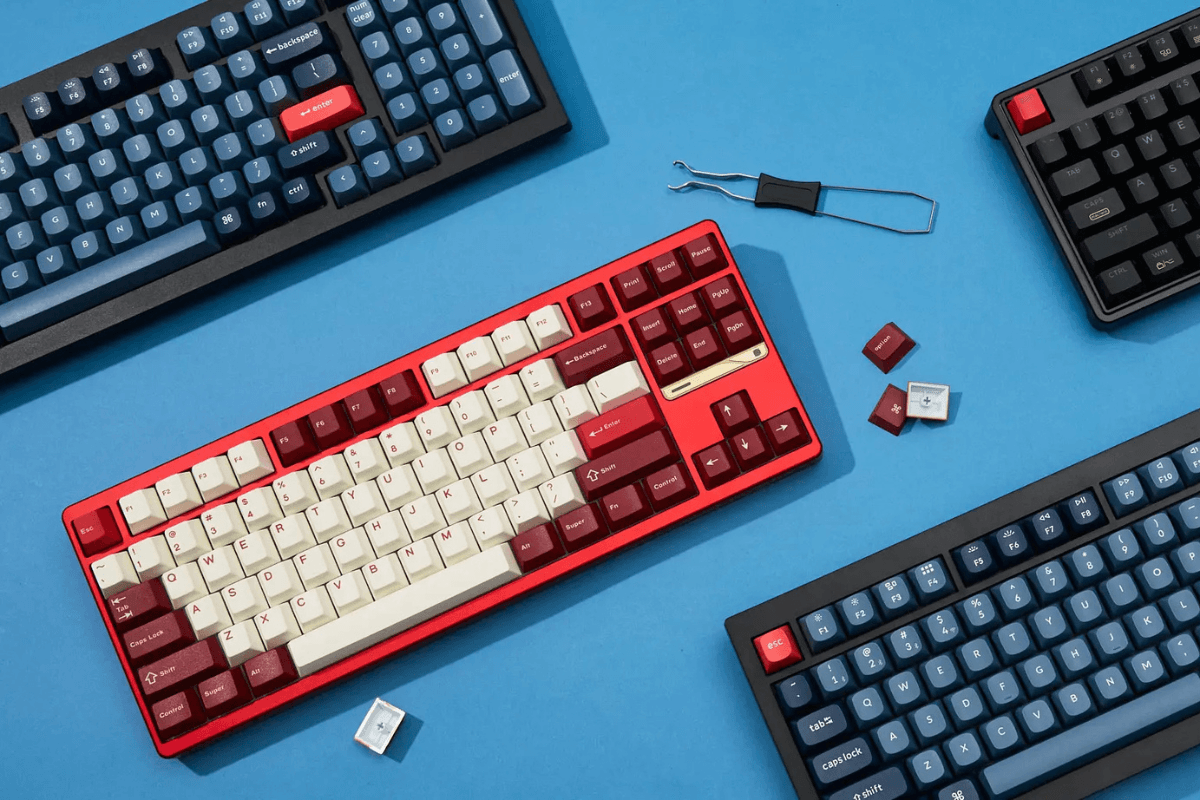
To choose a mechanical keyboard for both gaming and typing, start with the switch type and layout, then consider connectivity, hot-swap support, software, keycaps, and build quality. Most users will find that a 75% or TKL keyboard with linear or tactile switches offers the best balance.
| Feature | Recommended starting point |
| Switch | Linear or tactile |
| Layout | 75% or TKL |
| Gaming connection | Wired or 2.4GHz |
| Typing connection | Wired, 2.4GHz or Bluetooth |
| Keycaps | PBT |
| Customization | Hot-swappable |
| Gaming features | N-key rollover and remapping |
Competitive gamers may prefer lighter linear switches and a compact layout, while frequent typists may benefit from tactile feedback and dedicated function or arrow keys.
Choose the Right Mechanical Keyboard Switches
Choosing the right mechanical keyboard switches matters because each type changes the speed, feedback, sound, and comfort of your keyboard.
Linear Switches
Linear keyboard switches move smoothly without a noticeable bump. They are popular for gaming because they support fast, repeated keypresses and usually feel consistent. Lighter options can feel more responsive, although they may also cause accidental inputs.
Tactile Switches
Tactile switches provide a small bump when the key actuates, helping users recognize that an input has registered. They are often the best balance for people who play games but also spend significant time typing.
Clicky Switches
Clicky switches combine tactile feedback with an audible click. They provide clear typing feedback but may be distracting in offices, shared rooms, voice chat, or streaming environments.

For most gaming-focused users, linear switches are a safe starting point. If gaming and typing are equally important, tactile switches may provide a more balanced experience.
Pick the Right Keyboard Layout
The right keyboard layout depends on how much desk space you have and which keys you use regularly. A smaller board gives gamers more room for mouse movement, while a larger layout provides easier access to productivity keys.

| Layout | Best for | Main limitation |
| 60% | Maximum mouse space and portability | No dedicated arrow keys or function row |
| 65% | Compact gaming with arrow keys | No dedicated function row |
| 75% | Gaming and typing in a compact size | Keys are placed closer together |
| 80% (TKL) | Gaming, typing, and familiar spacing | No number pad |
| Full size | Data entry and productivity | Takes up more desk space |
A 65% keyboard suits gamers who want a compact setup without losing arrow keys. For most people who divide their time between gaming and typing, a 75% or TKL keyboard offers the best balance. Choose a full-size mechanical keyboard if you frequently use a number pad for work.
Choose Wired, 2.4GHz, or Bluetooth
A wired mechanical keyboard provides a stable connection, requires no charging, and is a reliable choice for competitive gaming or a permanent desk setup.
A 2.4GHz wireless connection uses a USB receiver and can provide performance close to a wired connection when implemented well. It is a good option for gamers who want a cleaner desk without giving up responsive input, although battery life and receiver placement still matter.
Bluetooth is best for convenience and switching between laptops, tablets, and other devices. Its latency varies by keyboard and device, so it is generally less suitable for competitive gaming.

Choose wired or low-latency 2.4GHz for gaming. Choose Bluetooth when multi-device convenience matters most, or select a tri-mode wireless mechanical keyboard for maximum flexibility.
Check the Features That Matter
Hot-Swap Support

A hot-swappable keyboard lets you replace compatible switches without soldering. This is especially useful if you are still discovering your preferred switch type or want easier repairs later. Check whether the sockets support 3-pin, 5-pin, or both types of mechanical switches.
Keycaps and Build Quality

PBT keycaps usually resist shine better than ABS keycaps, while solid stabilizers improve the feel and sound of larger keys such as Space, Enter, and Shift. Case material, plate design, and internal dampening also affect weight, sound, and typing comfort. These details often matter more in daily use than decorative features.
Gaming and Software Features

For gaming, look for N-key rollover, reliable anti-ghosting, key remapping, and stable wired or 2.4GHz performance. Software should make it easy to create macros, change shortcuts, and save profiles to onboard memory. Also confirm that the keyboard supports your operating system. RGB lighting is optional; dependable firmware and useful customization should take priority.
Match the Keyboard to Your Use Case
The best mechanical gaming keyboard depends on where and how you use it. Match the layout, switches, and connection to your main activity instead of choosing by specifications alone.
| Use case | Recommended configuration |
| Competitive FPS gaming | 60%, 65%, or TKL; linear switches; wired or 2.4GHz |
| Gaming and typing | 75% or TKL; linear or tactile switches; hot-swappable |
| Office and productivity | 75%, TKL, or full size; tactile switches; multi-device support |
| Shared or quiet room | Silent linear or quiet tactile switches |
| Frequent travel | Compact or low-profile mechanical keyboard; wireless connection |
| Keyboard customization | Hot-swappable board with broad switch and keycap compatibility |
For most users who game and type regularly, a 75% or TKL keyboard with tactile or medium-weight linear switches offers the most practical balance.
FAQs
Which mechanical keyboard switch is best for gaming and typing?
Linear switches are popular for gaming because they feel smooth and support rapid inputs. Tactile switches provide more feedback and often offer a better balance for users who spend equal time gaming and typing.
Is a 75% or TKL keyboard better?
A 75% keyboard saves more desk space by placing keys closer together. A TKL keyboard has more familiar spacing and a separated navigation cluster. Both include arrow and function keys, so the better choice depends on your space and layout preference.
Are wireless mechanical keyboards good for gaming?
Yes. A well-designed 2.4GHz wireless mechanical keyboard can provide responsive gaming performance. Bluetooth is more convenient for multiple devices but is generally less suitable for competitive gaming.
Is a hot-swappable keyboard worth it?
It is worthwhile if you want to test different switches or replace faulty ones without soldering. If you plan to keep the original switches, hot-swap support is less important.

Leave a comment
This site is protected by hCaptcha and the hCaptcha Privacy Policy and Terms of Service apply.